I built a Gratitude Tracker
Orchestrating Three Ecosystems Into a Nightly Ritual
It’s not an app. It’s three different ecosystems, orchestrated into a single workflow. Dictate a blessing anytime, get the full recap and an encouraging quote every night, and watch a live dashboard grow.
Dictate a blessing, anytime
Tap a Home Screen Shortcut and just talk. Mention more than one good thing — lunch with the kids, then the dog learning a new trick — and GPT-4o splits them into separate entries, each tagged with a theme: family, provision, rest, faith, adding rows for each in the sheet.
9:30pm, every night
An iOS Personal Automation quietly fetches the full day’s list, adds an encouraging quote, and texts it. A nightly gratitude reflection.
A living archive
A hosted dashboard fetches the same data live and shows the running history, every blessing, every night’s quote — a growing record of all the good in life.
Three ecosystems, handing data off to one another over plain HTTP.
Both sheet tabs live in one spreadsheet; a single shared-secret key gates every request across all three systems.
The Quote Pipeline
AI often hallucinates and I don’t want fabricated quotes so I built this verification loop.
Search the live web
OpenAI’s Responses API, with its web_search tool, is asked to find one real quote fitting that day’s themes — grounded in an actual page it searched, not generated from memory.
Verify it independently
The script re-fetches the exact cited URL itself and confirms the quote text is genuinely on the page — retrying a few times first, since free content sites occasionally have transient hiccups unrelated to accuracy.
Fall back to a live Bible verse
If verification doesn’t succeed, the best theme-matching reference is picked from a 33-verse bank — and the actual text is fetched live from a Bible API every time, never typed out or recalled from memory.
GET bible-api.com/{reference}?translation=kjvOne hardcoded safety net
Reached only if the Bible API itself is unreachable: a single, pre-verified line (1 Thessalonians 5:18, KJV) — so the message is never empty and never wrong.
A nightly ritual, fully orchestrated, with zero fabricated content
- Three ecosystems, Apple, Google, and OpenAI, wired together over plain HTTP behind a single shared-secret key
- A verification-first quote pipeline: live web search, then an independent re-fetch to confirm the quote is real, then a live Bible-verse fallback, then one hardcoded safety net — never a quote taken on faith
- A nightly recap that arrives on its own at 9:30pm, no tap required, and a live dashboard that grows every day
Built with Claude Code — Apps Script, iOS Shortcuts, and a verification-first approach to AI-generated content.
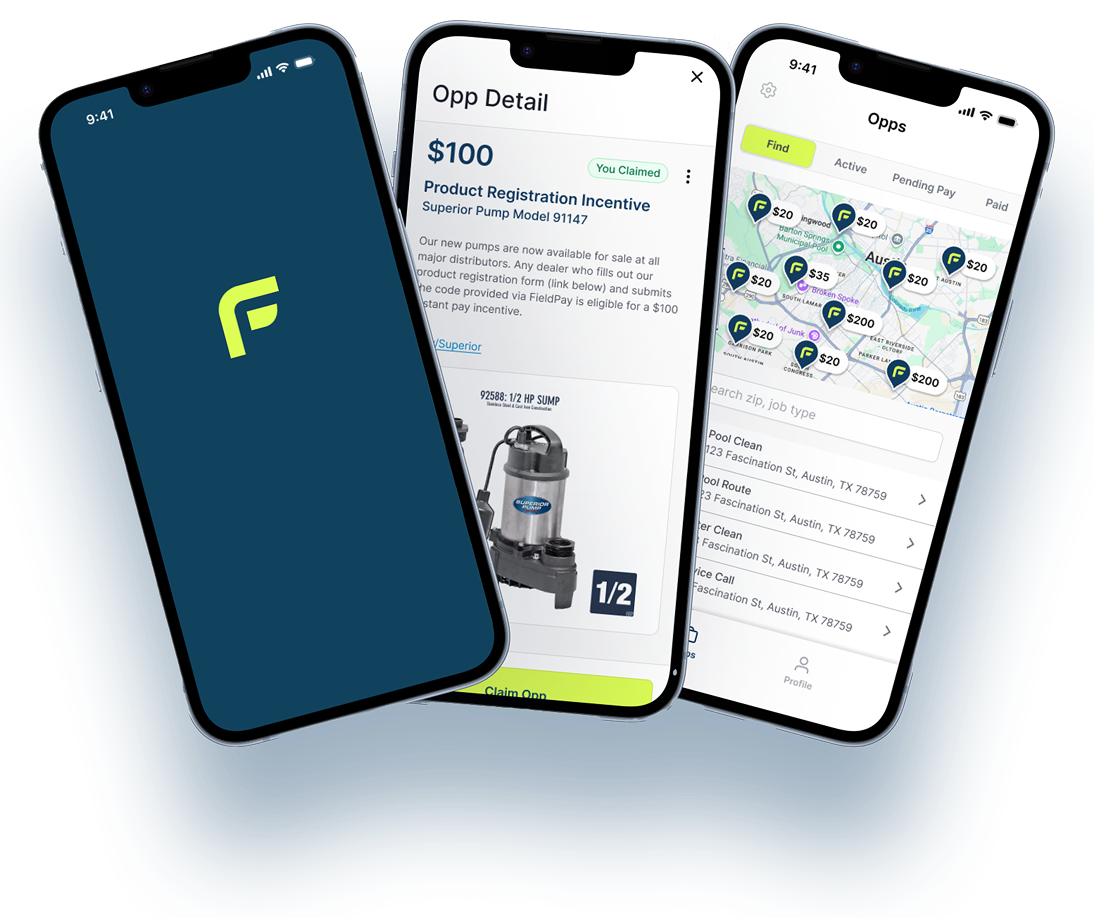
Designing FieldPay's Two-Sided MVP
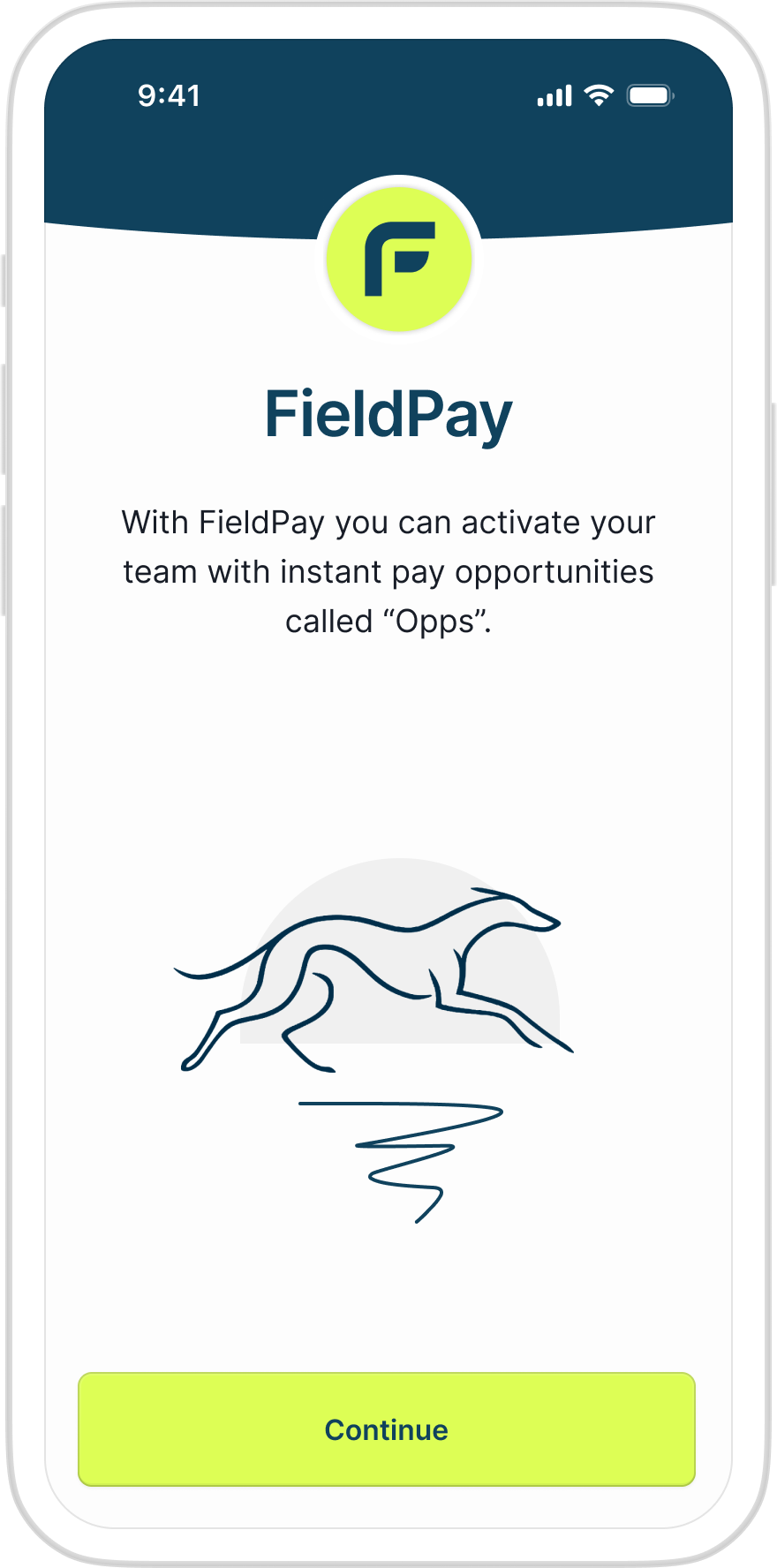
FieldPay pays trades workers the same day a job is done, not on the next payroll cycle. I was brought on as UX Design Lead to design the two apps that make that possible, one used by a business owner at a desk, the other by a technician standing in the sun with gloves on.
Labor is the #1 cost center in the trades, and owners are stuck being the bank
FieldPay's own research with pool, HVAC, roofing, and pest-control owners was blunt about it: labor was their single biggest pain point, hiring cycles were running $1,600+ per replacement, and techs would leave for whoever paid fastest. Owners wanted to reward good work, cover a same-day emergency call, or incentivize a slow route, but doing it meant waiting for the next payroll run. The gap between "the job's done" and "you got paid" was where trust broke down.
A tight scope, held to on purpose
The engagement was three months, phased, with a defined deliverable at the end of each: workflows, then wireframes, then handoff-ready visual design for two apps, Admin and Talent. Marketing and brand work was explicitly out of scope, so the design effort stayed pointed at the product two founders and I reviewed together two to three times a week. Keeping that boundary is what let a three-month engagement produce two fully specified apps instead of one half-finished one.
Turning a product spec into flows two very different users could follow
The starting point was a founder-written product spec: campaigns (job-specific or general cash incentives), a mixed roster of W-2 and 1099 workers, proof-of-work requirements, and a payout lifecycle that had to stay auditable. My job was to map that into concrete paths, campaign creation, talent roster management, and campaign monitoring on the Admin side; opportunity discovery, claim, proof submission, and cash-out on the Talent side, before a single screen got drawn.
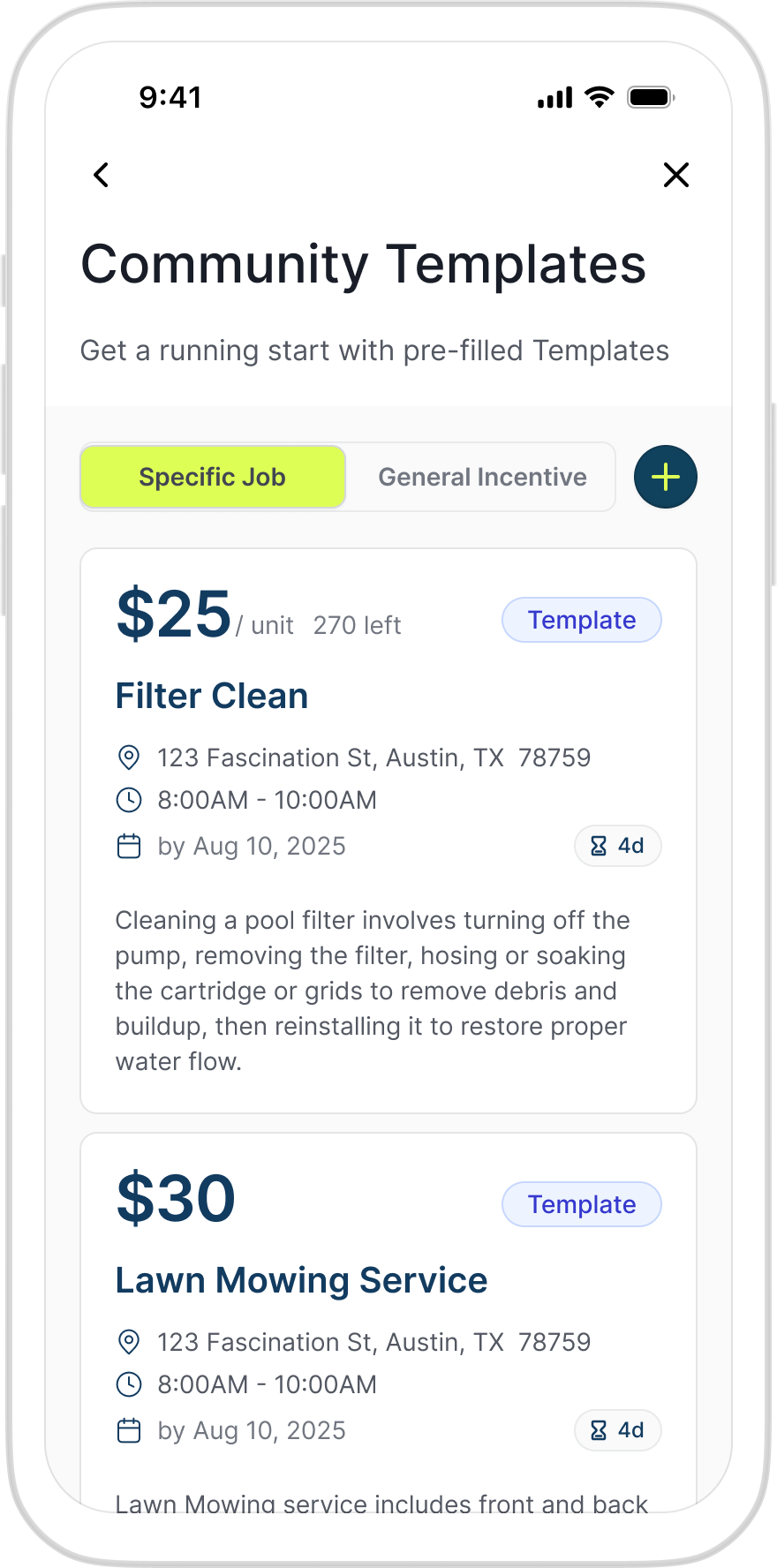
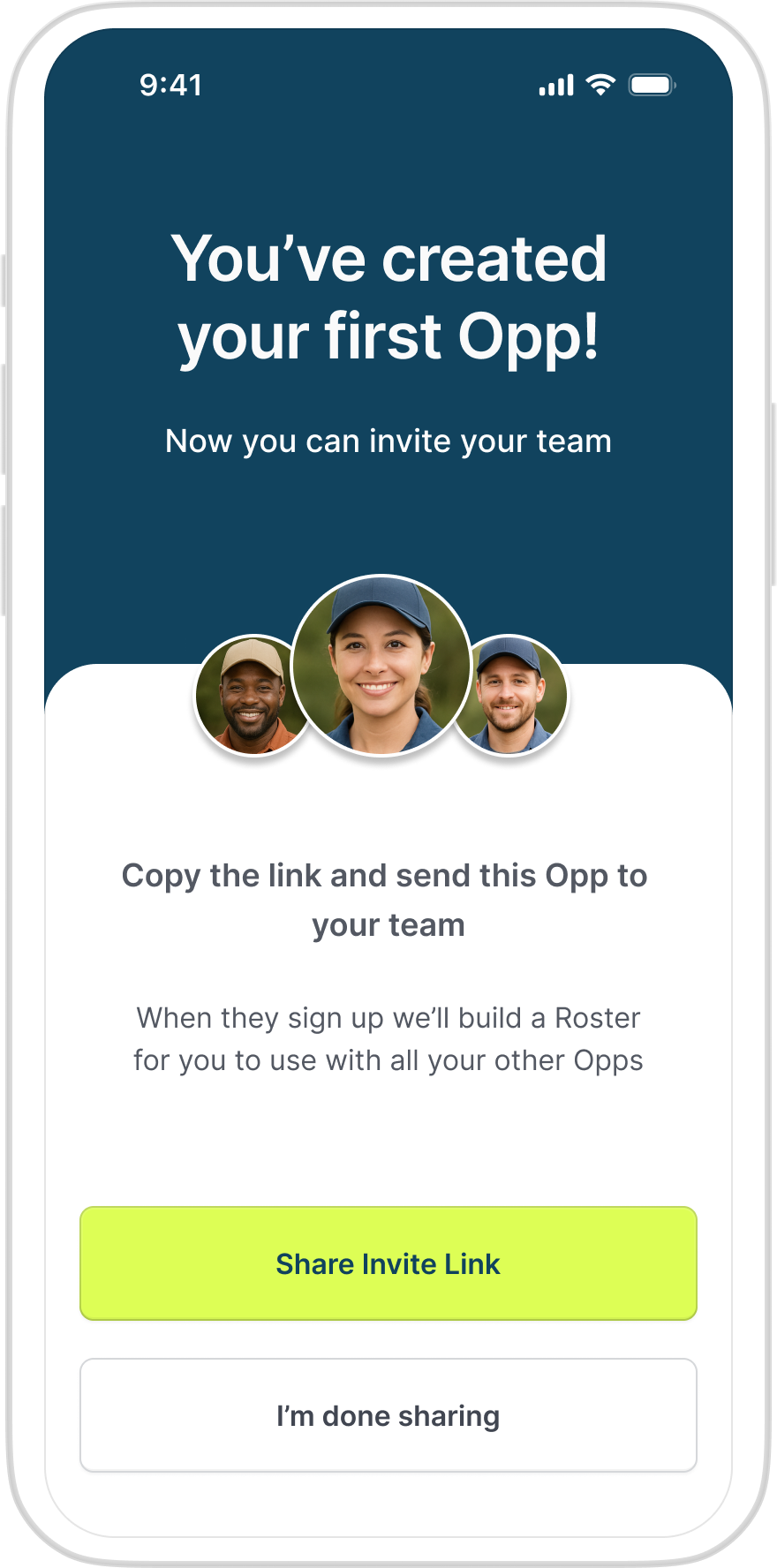
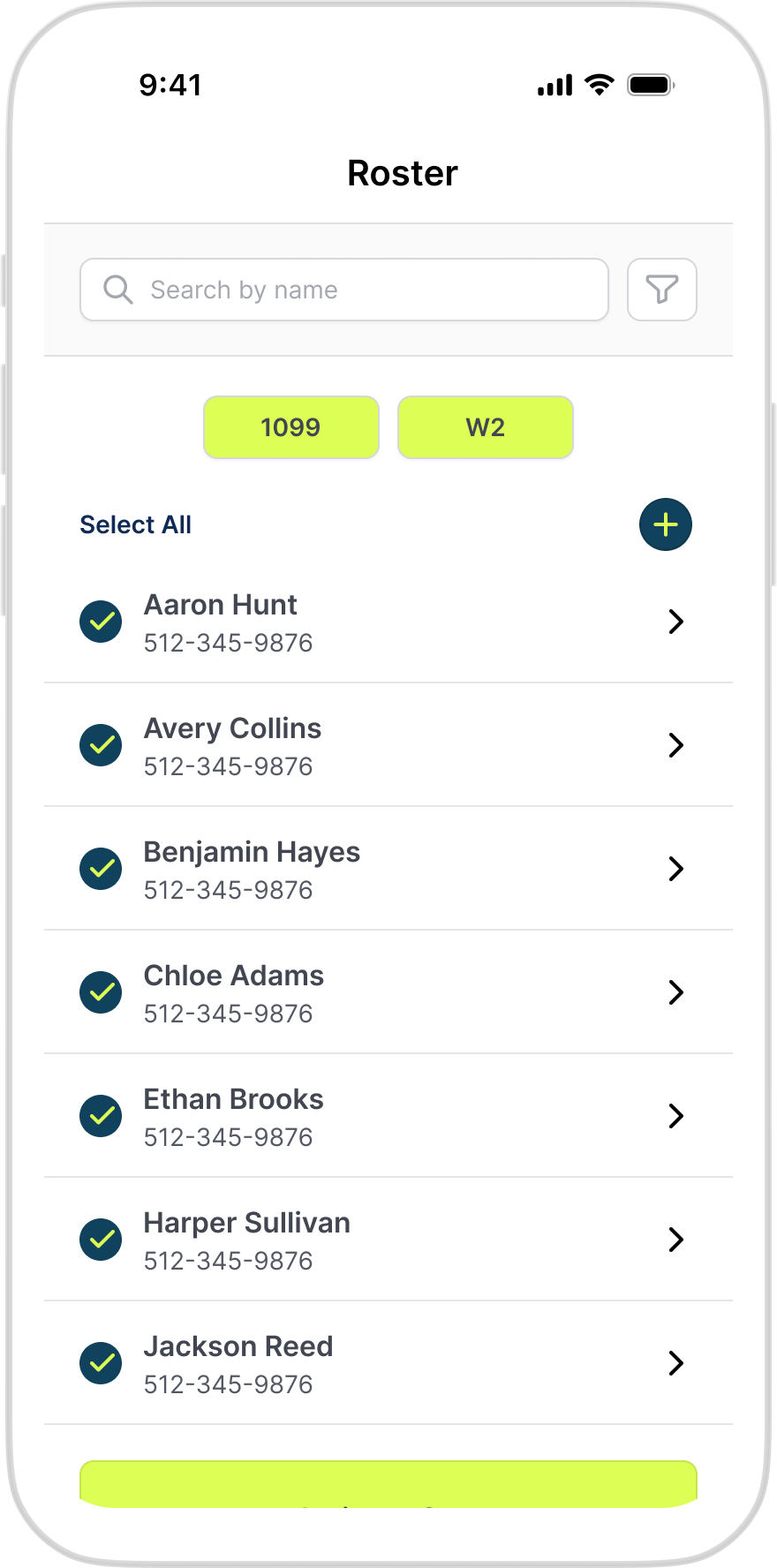
Business owner configures a cash incentive from a community template or from scratch: rate type, a W-2 and a 1099 rate, proof-of-work requirements, and an optional GPS check-in, then assigns it to talent from the roster.
One product, two rulebooks
The Admin app is used at a desk, in a slow moment, by someone who wants density and audit trails. The Talent app is used in a truck or on a roof, one-handed, often in direct sun, by someone who wants three taps and a clear answer. Wireframing both side by side meant writing a separate set of design rules for each before drawing a single screen, so speed for one side never came at the cost of clarity for the other.
| Design Rule | Talent App (Field) | Admin App (Desk) |
|---|---|---|
| Priority | Glare-friendly, high contrast, large bold type | Status at a glance, color-coded, scannable |
| Interaction | 48px minimum tap targets, 1–3 taps per action | Inline editing from the list view, with autosave |
| Resilience | Offline-tolerant, local autosave, deferred sync | Real-time refresh with a visible "last updated" stamp |
| Trust signal | Push-first: pay and location visible without opening the app | Full audit trail: who created, edited, reassigned, or deleted |
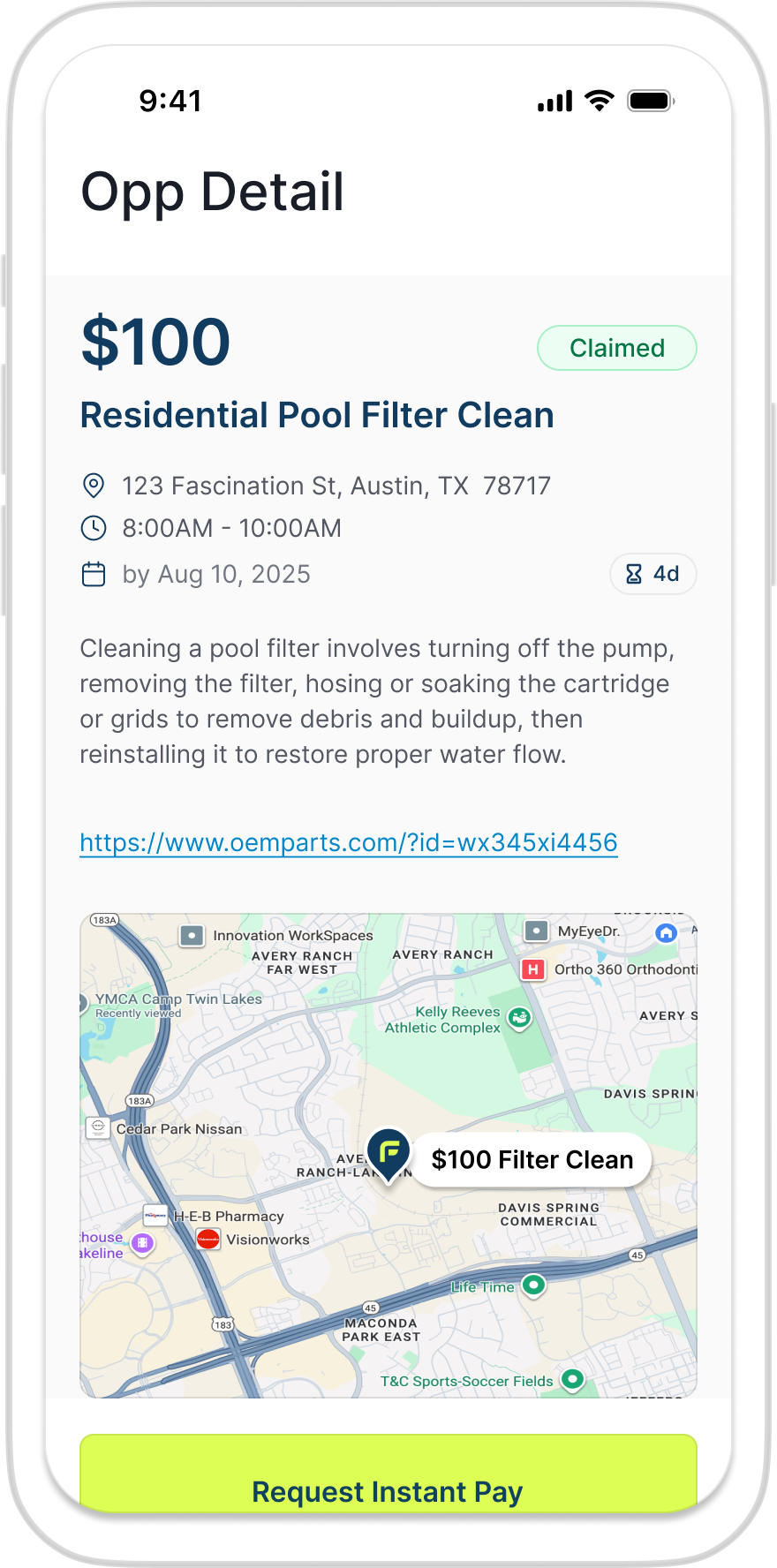
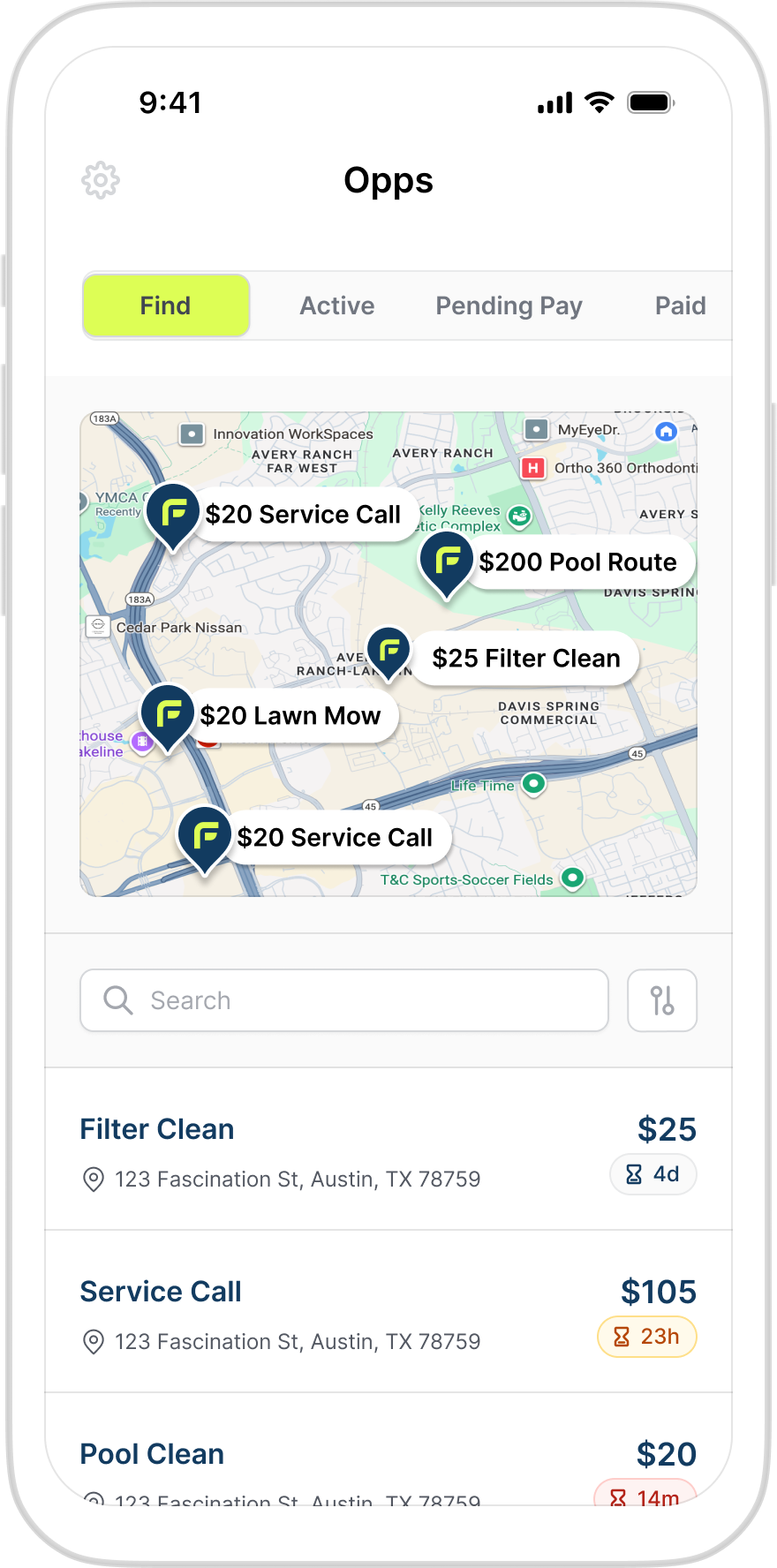
A worker browses open incentives on a map or list, rate, location, and time-to-expire visible up front, and claims or counterbids in one or two taps.
From wireframe to a handoff package engineering could build from
The final phase moved both apps from structure to finished UI, adopting an existing component library rather than building type and spacing decisions from zero, so the engineering team got a Figma handoff package with interaction notes instead of static pictures. The moment the design had to earn its keep was payout: proof of work submitted, fees shown, cash landing the same day. If that screen didn't read as instant and trustworthy, nothing else in the app mattered.
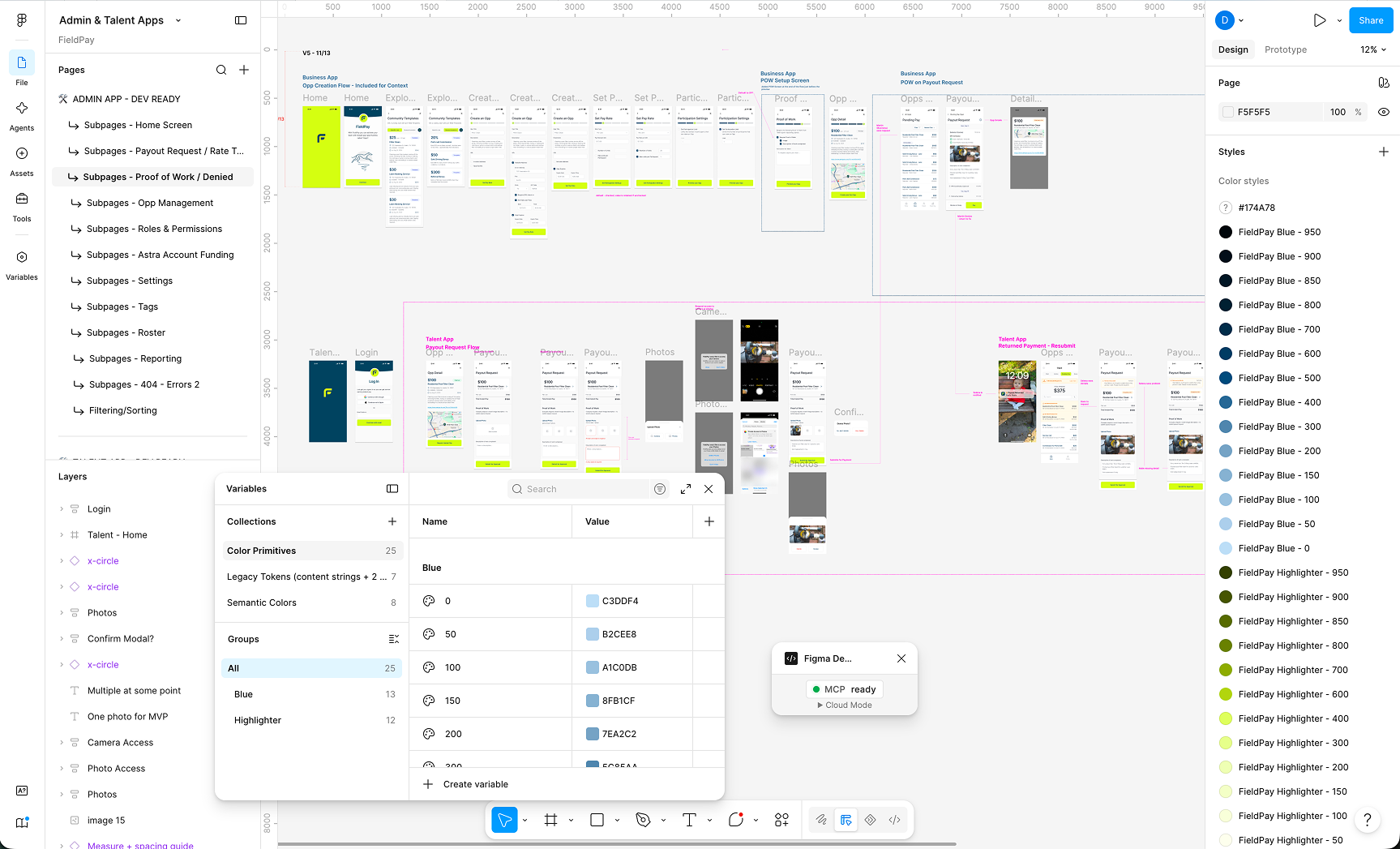
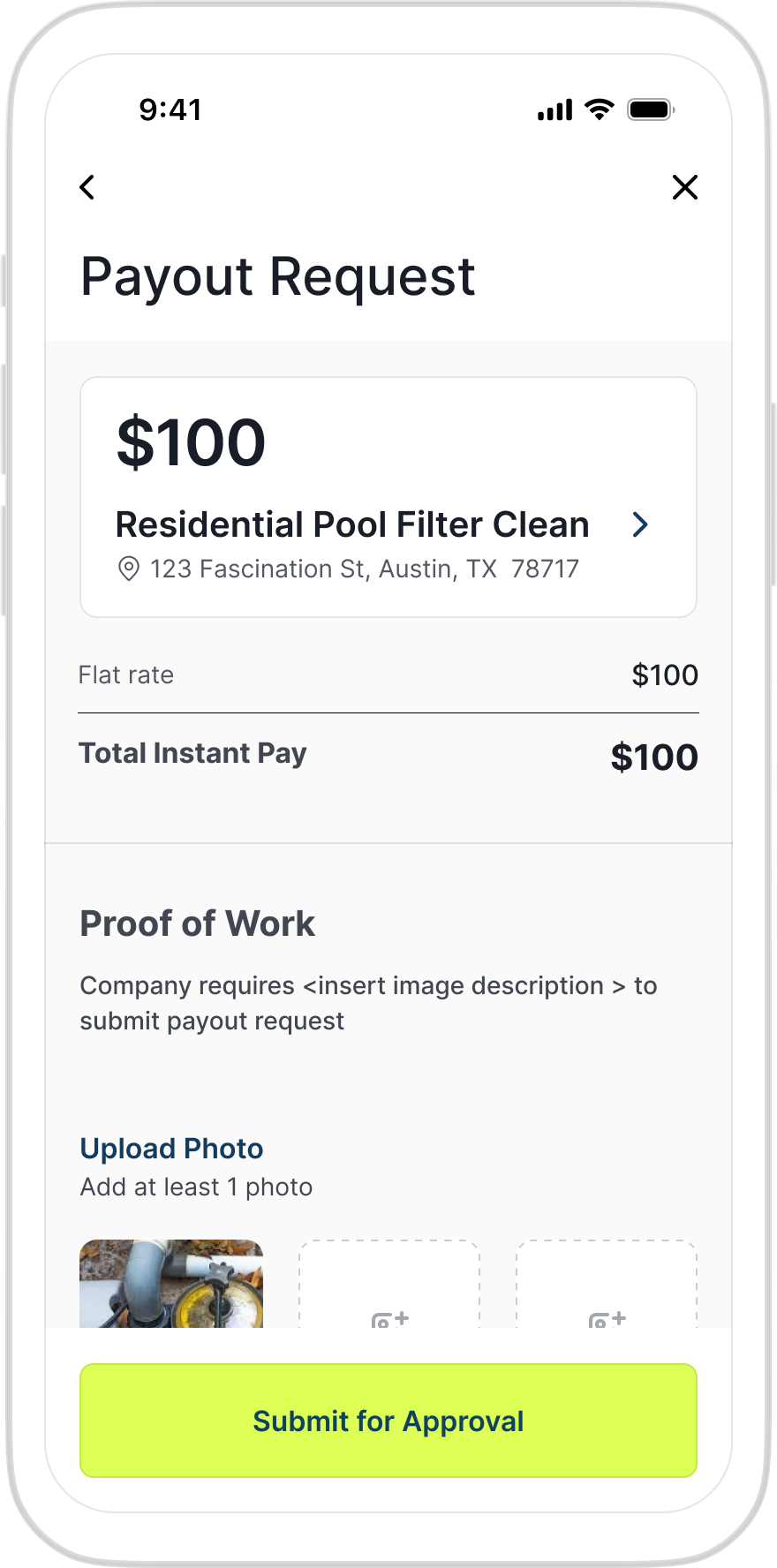
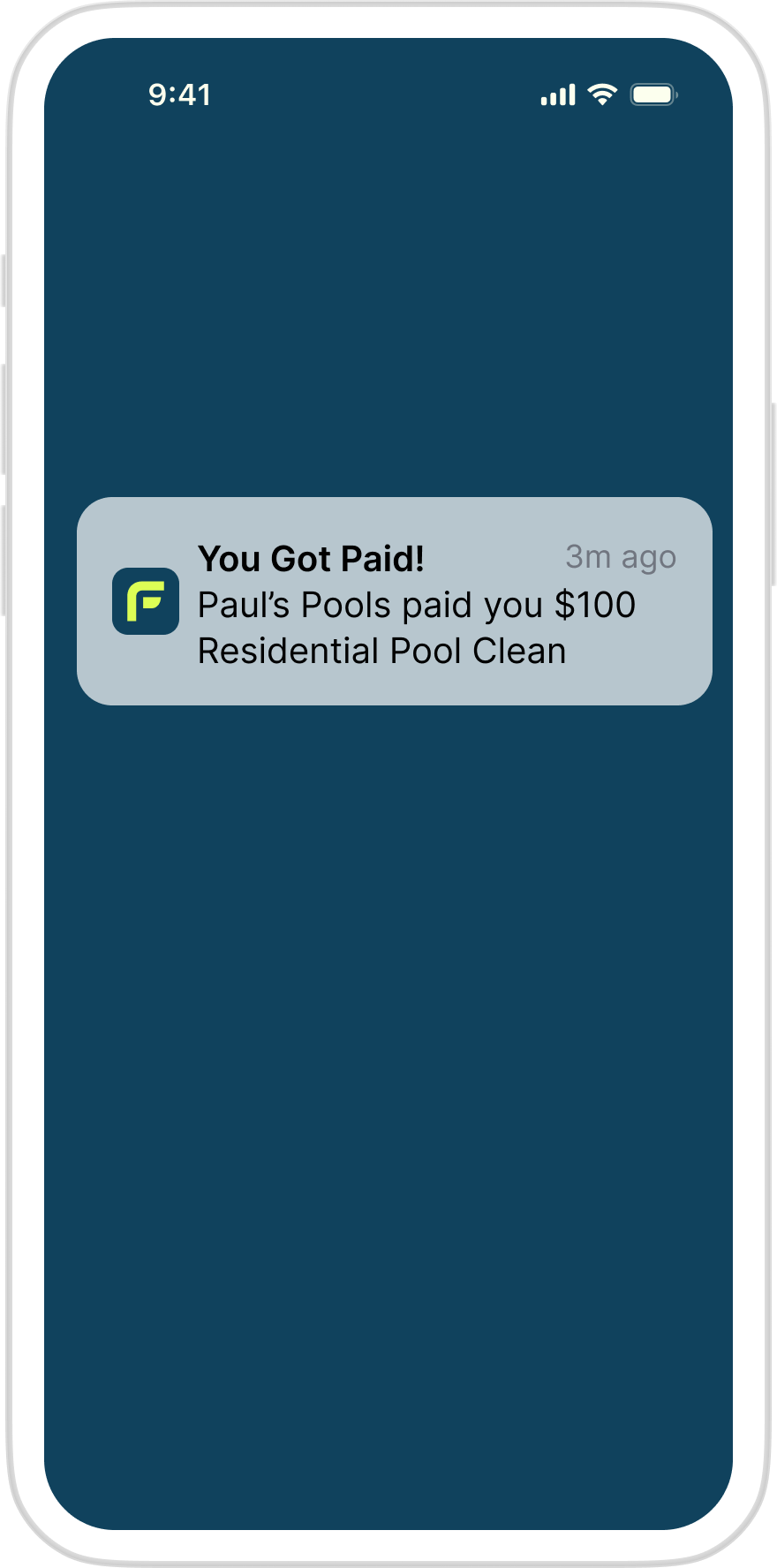
The full payout journey mocked up across both apps, interaction notes, state changes, and edge cases called out directly in Figma alongside component references, spacing, and copy, so engineering could build from it without a separate spec.
A validated, handoff-ready MVP for both sides of the marketplace
- Full workflow diagrams, wireframes, and hi-fi UI delivered for both the Admin and Talent apps
- A documented set of design principles, one for field conditions, one for desk conditions, that now governs how new features get built
- A Figma handoff package engineering could pick up directly, no separate spec document required
- Design decisions grounded in the founders' own field interviews rather than generic fintech patterns
This was a pre-launch MVP engagement, so the measure of success wasn't a dashboard metric, it was whether two founders could hand a validated design system to engineers and start building. They could.
I Didn't Set Out to Build a Job Search OS
I started with one goal: stop rewriting my resume for every application. What I built over the following months was something else entirely, a complete job search system that emerged from solving each new bottleneck as it appeared.
Four steps. None of them hard. All of them time-consuming.
Applying for a job online follows a predictable sequence. Find a posting worth applying to. Open your resume, read the job description, identify key requirements, rewrite bullet points, adjust terminology, optimize for ATS keywords, then export. Open the application, upload the file, fill in your name and contact details, paste your LinkedIn URL, paste your portfolio URL, answer the EEO questions. Log it: company, title, date, status. Repeat.
None of those steps are hard. But each application took 15–20 minutes. At job search volume, that overhead adds up to weeks of mechanical work, time that should go toward the parts that actually require judgment.

From blank resume to tailored application package, in 10 seconds.
The most time-consuming step was also the most systematic: customizing the resume. I built a pipeline using Google Apps Script and the OpenAI API that takes a job description, identifies the top matching skills and keywords, and rewrites the resume to lead with the most relevant experience.
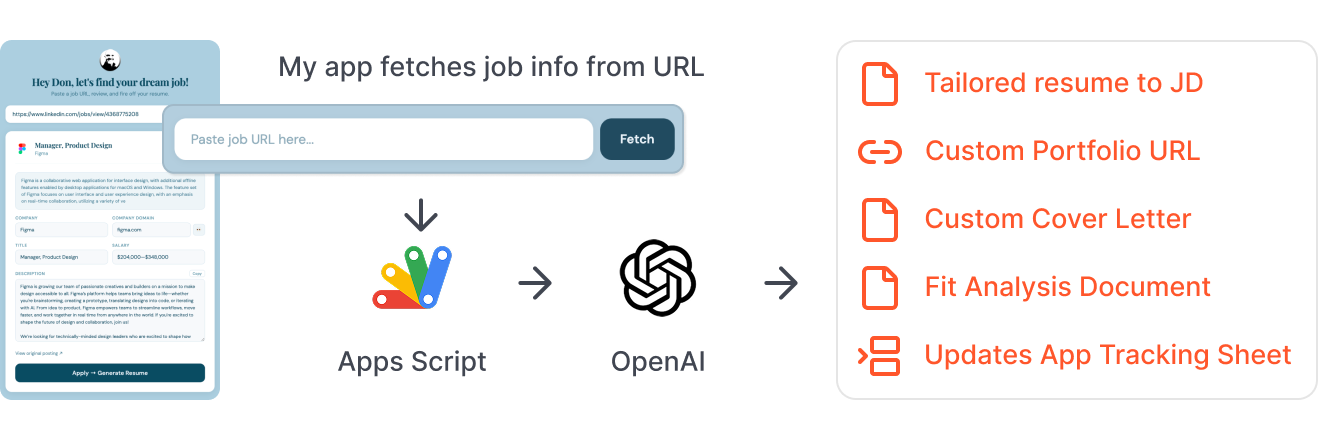
Each run produces five things:
?source=CompanyName link so I can track which employers clicked through to my portfolio
Initially I triggered the pipeline by pasting the job description into a Google Form. I replaced that with a local Flask app: paste a URL, the job details are fetched automatically, the pipeline fires. No copy-paste. That change surfaced something worth keeping, because every resume already included a personalized portfolio URL, the fit statement and welcome message OpenAI generated became ready-made cover letter material. Content that started as a tracking feature turned into part of the application itself.
15–20 minutes per application. Now 10 seconds.
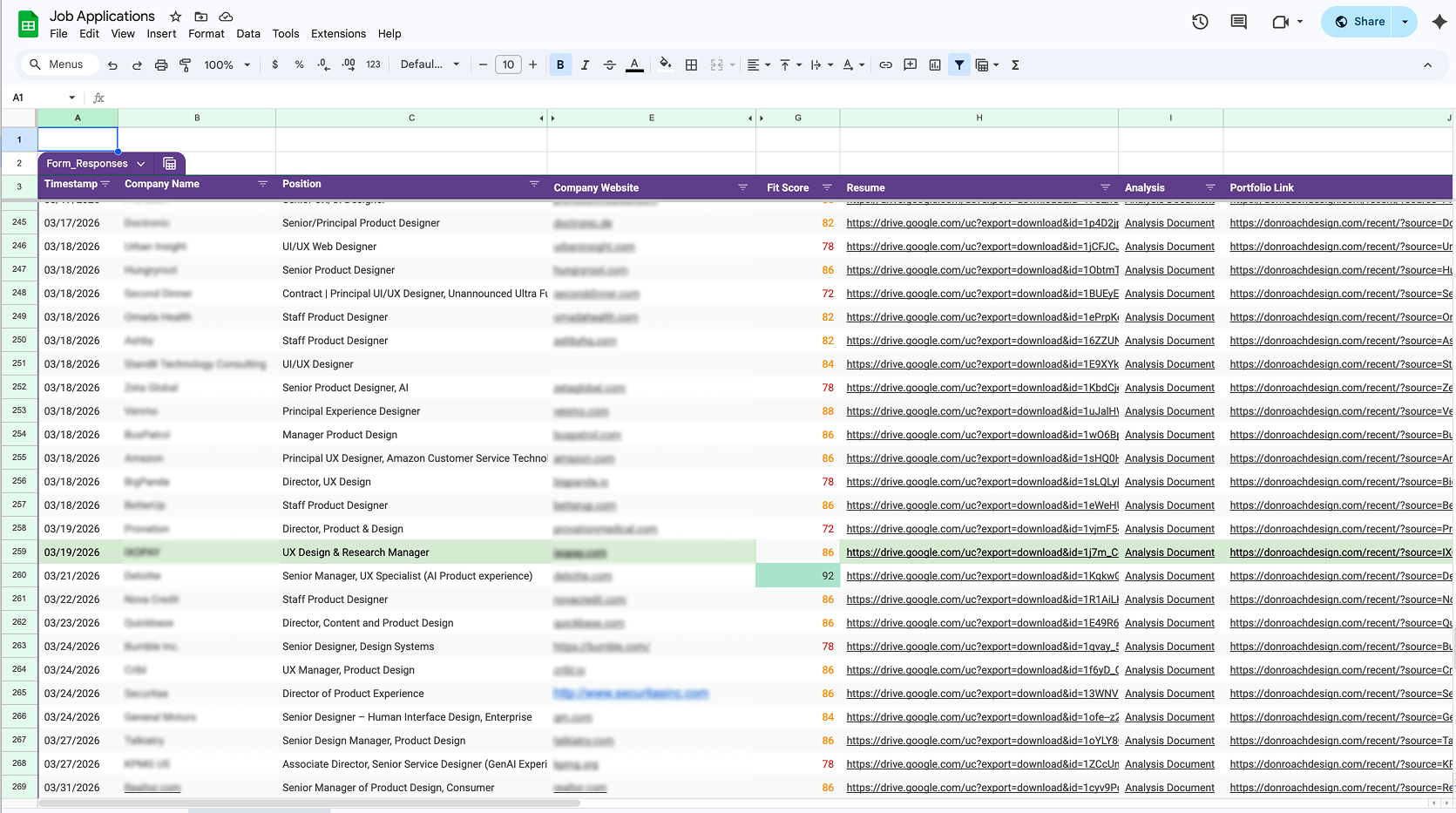
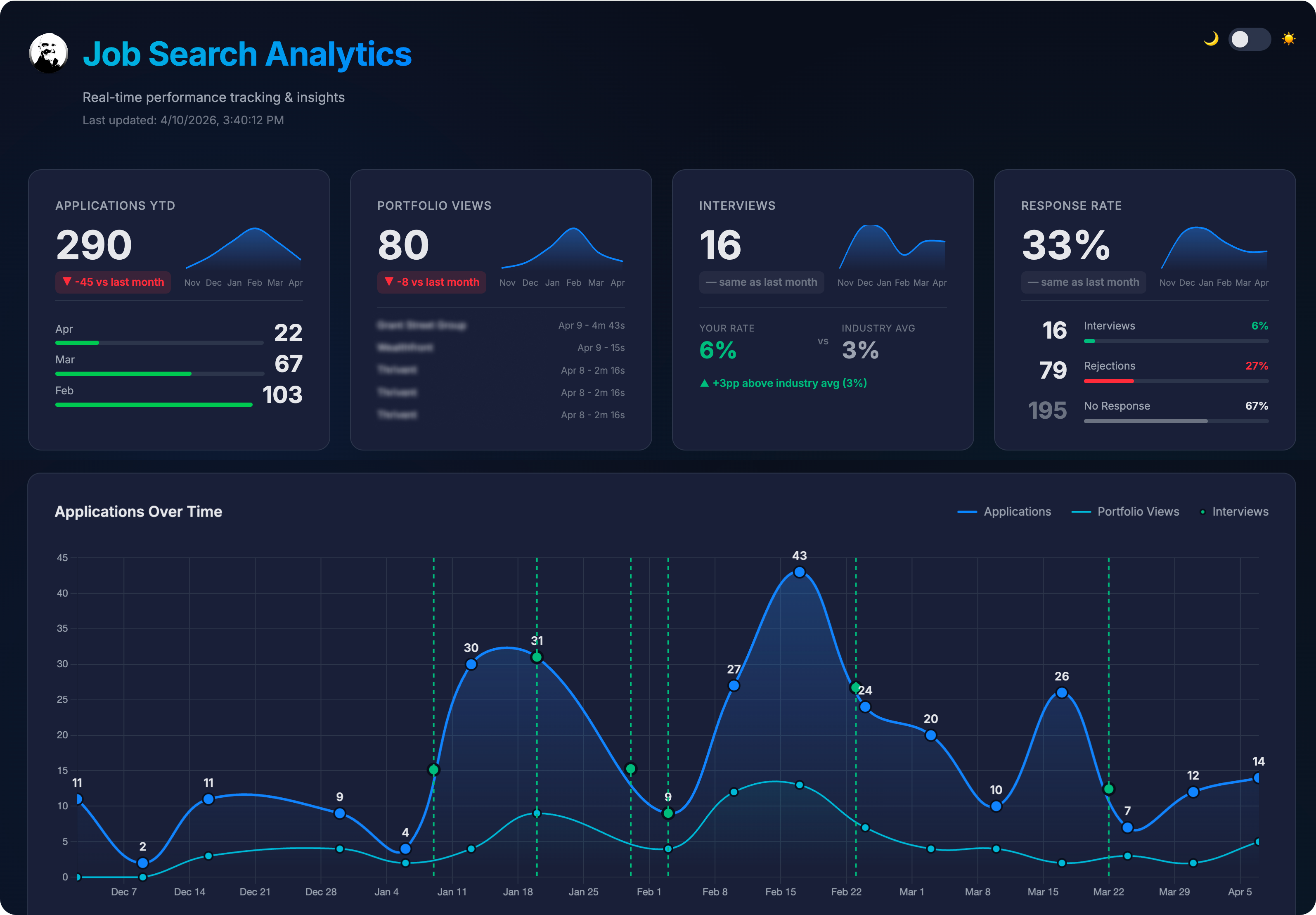
One screen. Everything you need to paste.
Generating the resume solved the customization step. But applying still meant tab-switching, job description in one tab, the application in another, the portfolio URL typed from memory. Small friction, repeated hundreds of times.
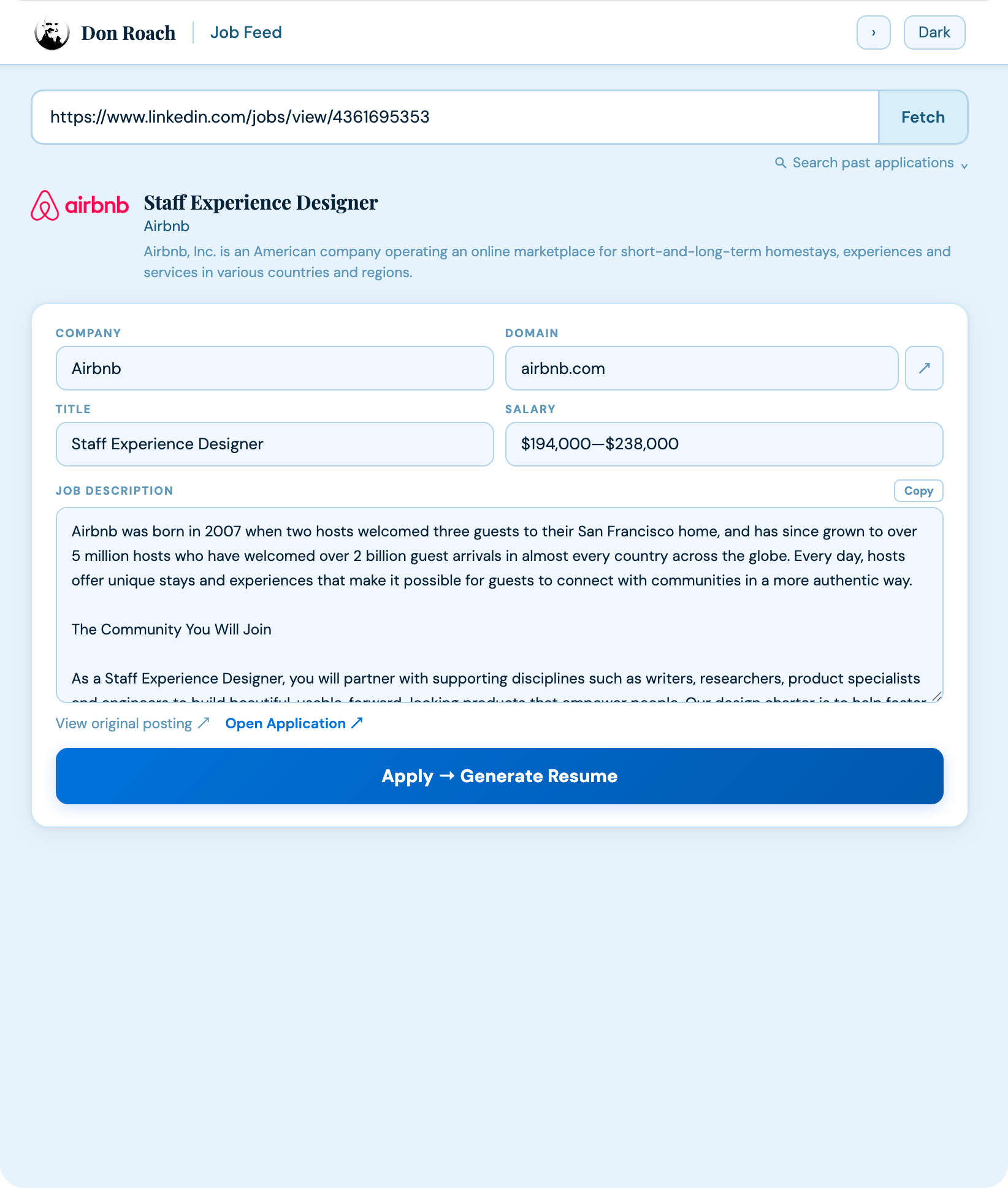
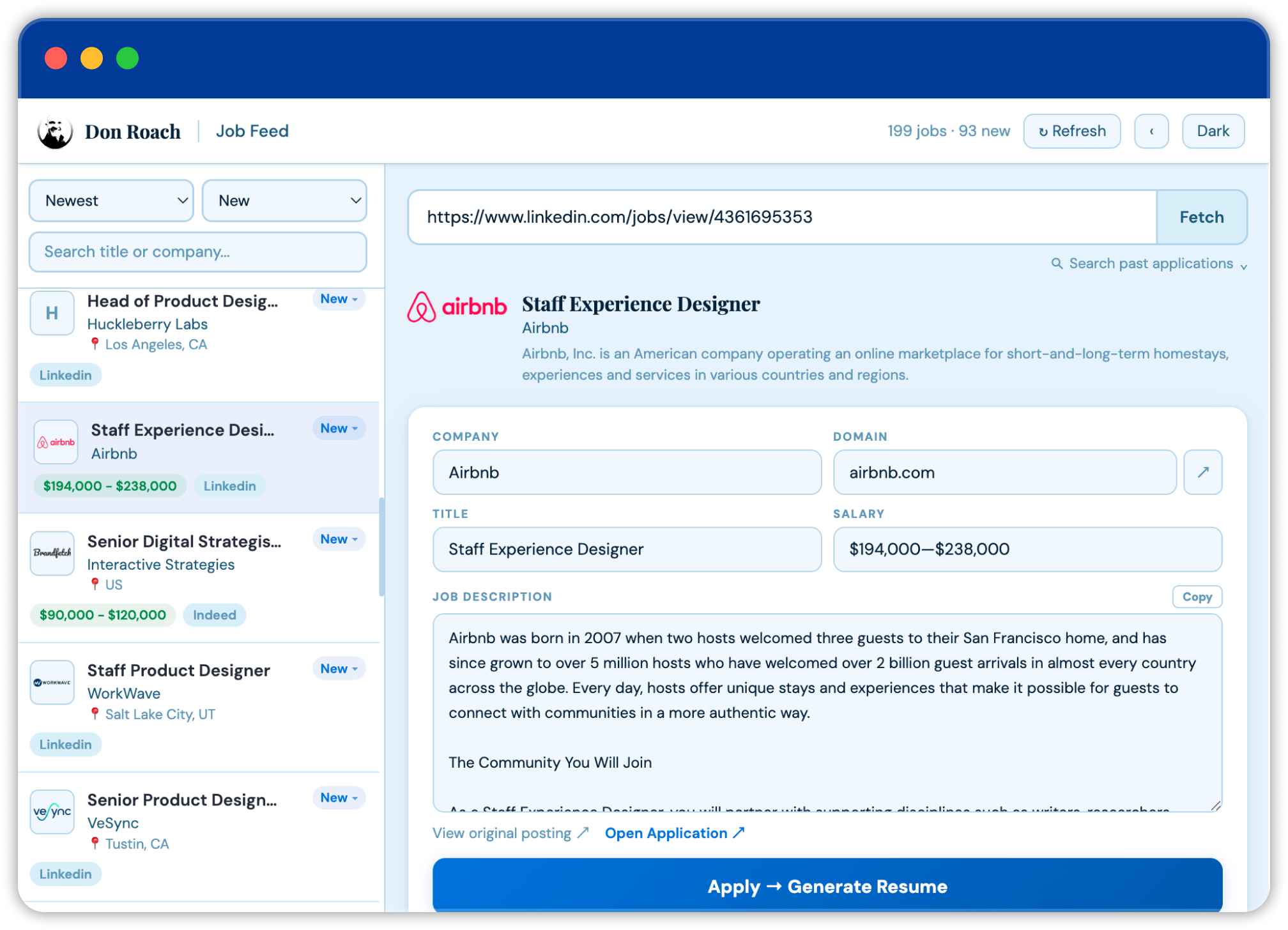
I created a Python app running locally that fetches job posting information for review. Clicking "Apply" kicks off the custom resume automation.
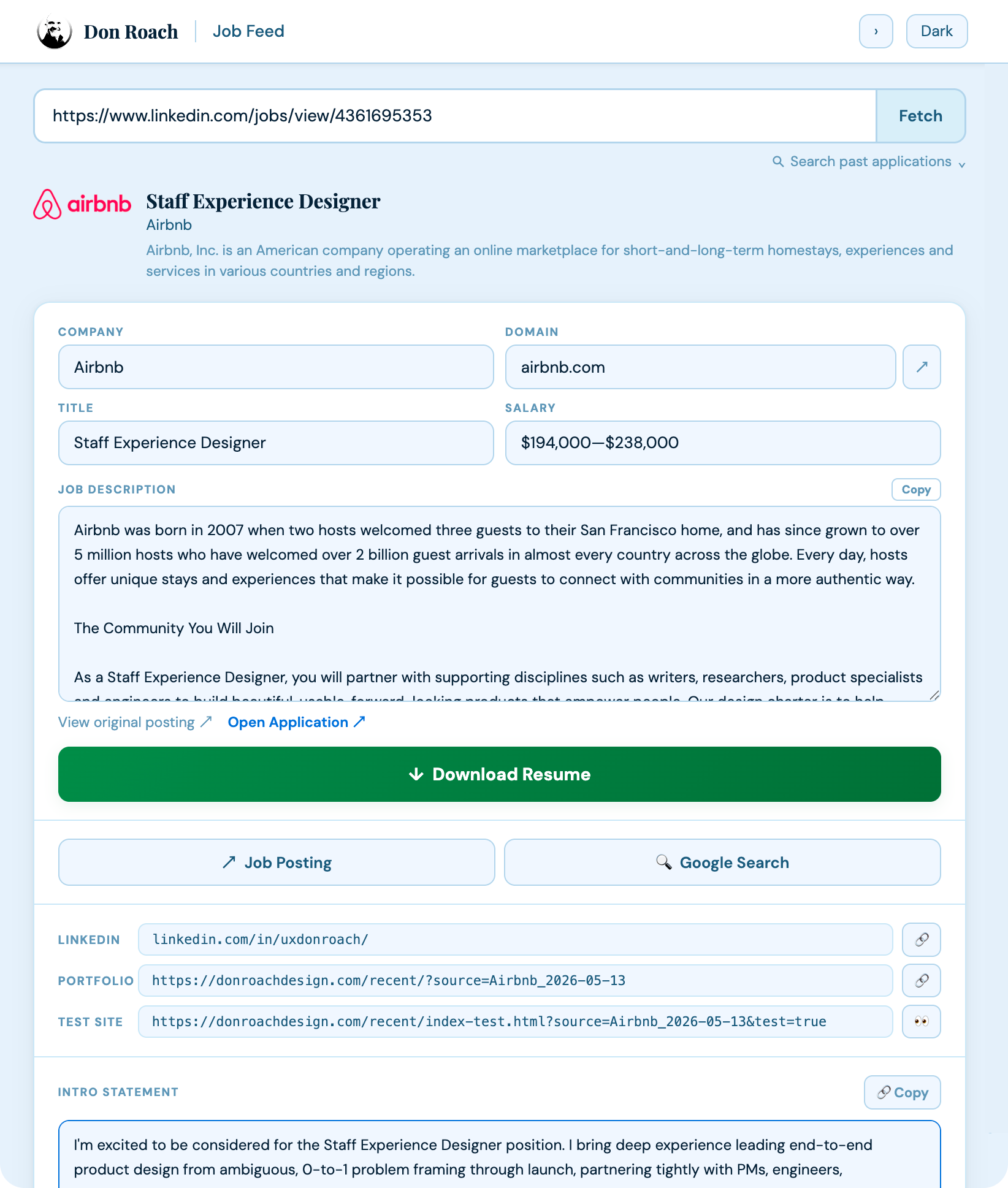
The tailored resume can now be downloaded, custom links are ready to be pasted into an application, and a custom intro can be used for a Cover Letter, so applying is a matter of pasting, not thinking.
Everything needed to complete an application is in one place: the job description, resume link, custom portfolio URL, fit statement, and cover letter copy, already written, already waiting. A lookup field pulls up any prior application by company name. One click logs it complete.
Stop hunting. Let jobs come to you.
The application steps were faster. Finding jobs was still entirely manual: browsing job boards, scanning listings, deciding what was worth pursuing.

A scheduled script runs JobSpy against LinkedIn, Indeed, Glassdoor, and others, filtered to the roles and locations I'm targeting. It deduplicates against applications already sent before writing anything, so I never see a posting I've already acted on. New listings land in a Job Feed with status chips: New, Applied, Already Applied, Not Interested.
Clicking a job card fires the description to the Quick Apply panel, which auto-fetches the JD, no URL required. The Command Center loads in the background. The employer's application page opens in the right column when the resume is ready. One click marks it complete and updates the status chip. The entire workflow, from browsing a listing to submitting, in a single view.
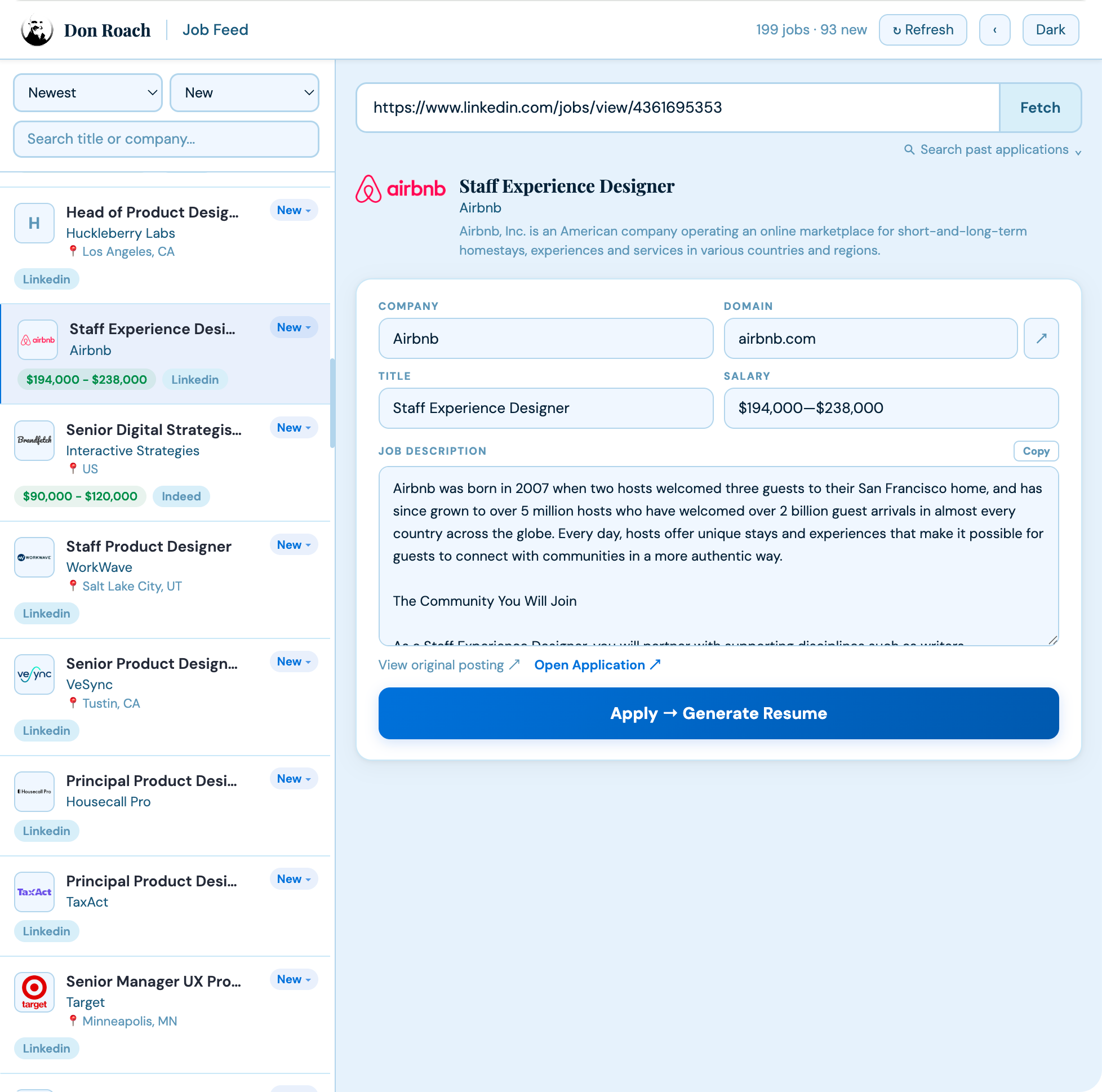
No more hunting around on separate job boards. Running the JobSpy Python app locally scrapes multiple job boards and delivers curated job postings that I can browse and apply for.
Application history, surfaced where you actually browse.
One gap remained outside the system. Browsing LinkedIn meant landing on postings without knowing whether I'd already applied, or interviewed, or been rejected. Checking required leaving the page and searching the tracking sheet.
A TamperMonkey script closes it. It runs on every LinkedIn job page and queries a local Flask server, which checks the tracking sheet and the job feed for prior activity at that company. The result surfaces inline on the posting: whether I've applied, when, for which role, what the current status is. Multiple interactions with the same company, different roles, an interview, a rejection, all visible before deciding whether to engage again. The system escaped the browser tab.
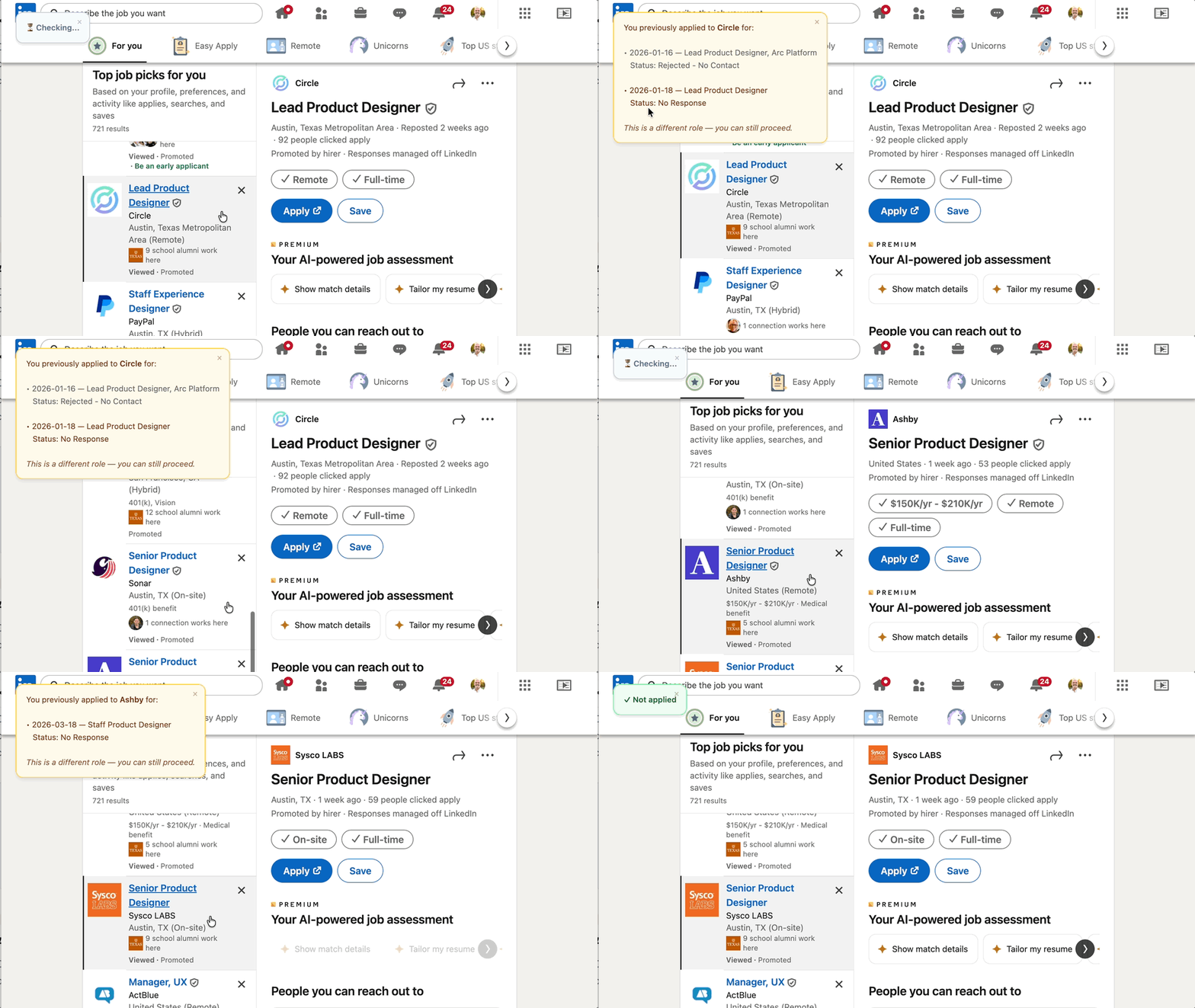
Four components. One source of truth.

Everything runs through Google Sheets as shared state, applications logged, job postings queued, outputs stored, status tracked. Every other component reads from or writes to it.
- Job postings arrive automatically, deduplicated against applications already sent
- Resumes generate in 10 seconds, tailored to role type and ATS requirements
- Application materials, resume, portfolio URL, fit statement, cover letter copy, are staged before the form opens
- Application history surfaces inline on LinkedIn without leaving the page
The parts that still require judgment, whether a role is worth pursuing, how to position a specific experience, what to say in an interview, get full attention. That was always the point.
Claude as Creative Partner
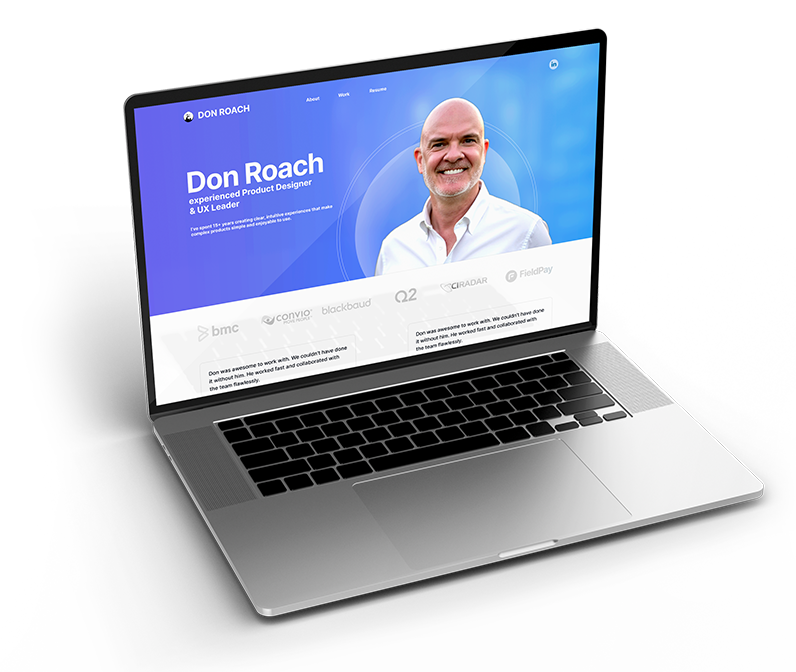
I first started using Claude Code in July 2025. My first project was to create a new portfolio website. I've always built my portfolio websites manually without the use of template sites like Wordpress or Wix. This time I used Claude Code. Here's how it went.
The design I wanted would have taken weeks to build by hand
I had a clear vision: scroll-triggered animations, staggered effects on gallery items, a custom lightbox with keyboard navigation, and a responsive layout that worked precisely across all breakpoints. I've built sites in HTML, CSS, and JavaScript before. But reaching that level of precision the traditional way requires a significant time investment, and I wanted to spend that time on design decisions, not debugging CSS.
AI changes what's worth doing yourself
The design work, layout decisions, visual hierarchy, imagery, copy, was mine to own. The implementation work was systematic: write this component, wire this interaction, fix this breakpoint. That's where AI could compress the timeline without compressing the craft. The question wasn't "can AI design for me?" It was "what's the right division of labor between a designer and an AI execution partner?"
Designed in Figma. Built with Claude. Iterated constantly.
I designed the full experience in Figma, created imagery in Photoshop, and wrote the core copy myself. Claude handled implementation, and I iterated probably a thousand times, just like any design project. The difference was the pace. Adjusting a timing curve, testing an alternative layout, fixing a mobile edge case, what would have taken hours of manual debugging moved in minutes. The animation system alone, scroll-triggered fade and scale effects, staggered gallery animations, a custom lightbox, would have been days of JavaScript work. With AI, I described the behavior, reviewed the implementation, and refined the details.
Production-grade interactions. Days, not weeks.
- Full bespoke site with custom animation system shipped in days
- Every design decision made by a human, AI handled execution
- Responsive design across all breakpoints without manual CSS debugging
AI didn't replace my design judgment. It raised the ceiling on what I could execute within a given timeframe. That's the shift, not "AI instead of designer," but "designer with AI" moving at a pace that wasn't previously possible.
Soccer Coach App
I was coaching a 10U girls soccer team while managing attendance, substitutions, playing time, and three separate timers. The logistics were consuming more attention than the coaching.
Managing logistics was pulling focus from coaching
With a 5v5 setup, 25-minute halves, and substitutions every 5 minutes to keep players fresh in the Texas heat, I arrived at every game with a notepad full of rotation plans that became obsolete the moment attendance was taken. I'd scramble to recalculate who was present, who'd played the most minutes, who needed time in their preferred position, and when the next sub window was coming, while also running a game clock, a rotation timer, and trying to actually coach. It was error-prone and exhausting. Position preferences mattered (some girls loved playing goalie; others specifically didn't want to). Ensuring fairness across the season required more tracking than any manual system could reliably handle.
The logistics were rule-based. They could be automated.
The rotation logic followed consistent rules: equal playing time, respect position preferences, account for absences, sub every 5 minutes. That's a solvable system. The human judgment, reading the game, coaching in the moment, responding to what's happening on the field, that's what I should be doing with my attention.
Select attendance. Get a complete rotation plan.
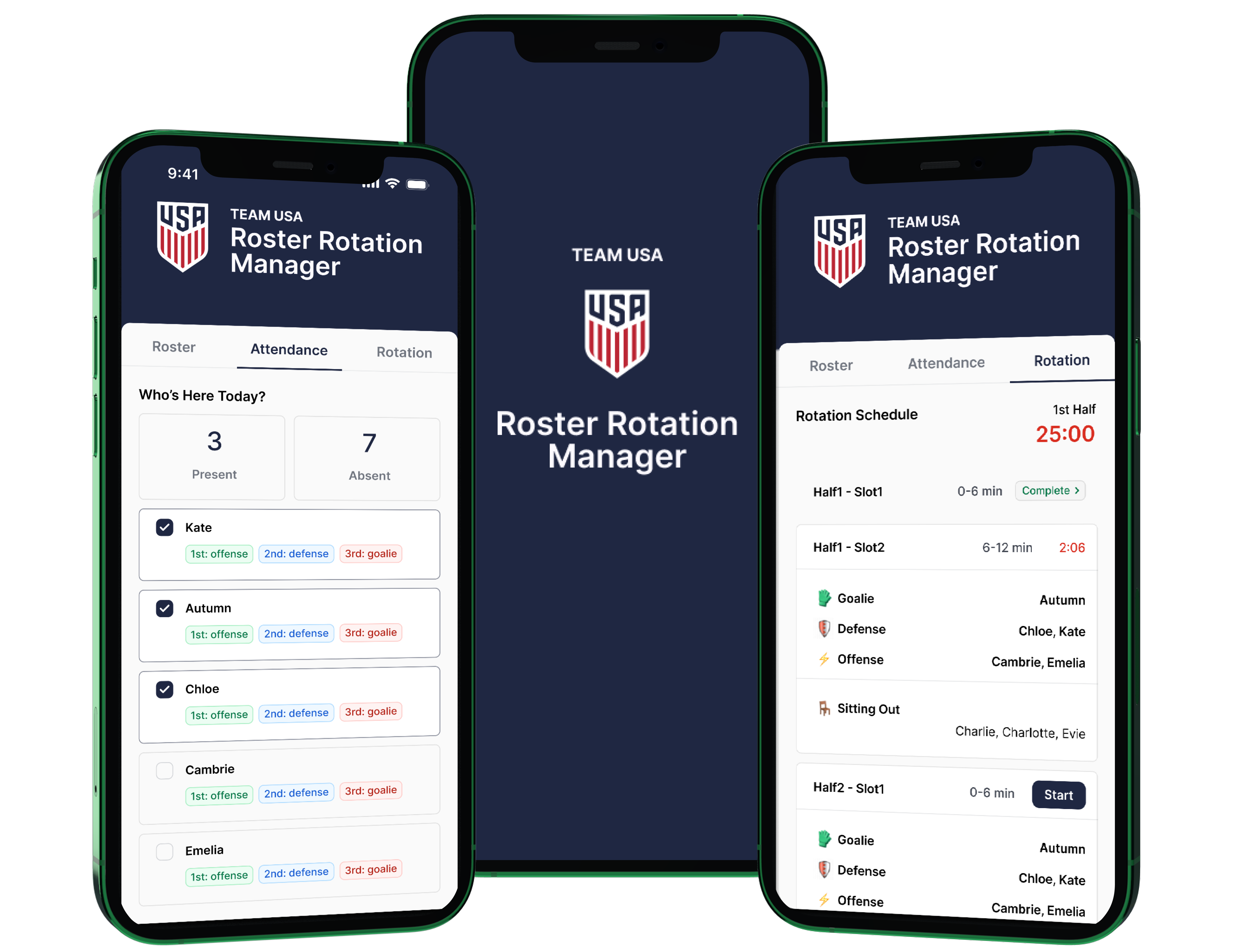
I built a web app that takes attendance as input and generates a complete substitution schedule. It distributes playing time across positions, respects individual preferences (including goalie restrictions), and accounts for absences automatically. Dual timers, one for the half, one for the 5-minute rotation window, run simultaneously on the same screen. After the final whistle, the app generates a post-game report: minutes played per player, positions covered, number of times out.
| Area | Before | After |
|---|---|---|
| Rotation Planning | Pre-game scramble, obsolete the moment attendance changed | 30-second attendance tap, complete schedule generated |
| Sub Tracking | Manual notepad, error-prone under pressure | Automated 5-minute windows with dual timers |
| Playing Time Fairness | Best-guess, hard to verify across the season | Distributed automatically, position preferences respected |
| Post-Game Reporting | None | Auto-generated minutes per player, positions covered |
| Coach Focus | Split between logistics and the game | Full attention available for coaching |
CIRadar UI Modernization
A feature-rich web app with a dated UI. The challenge: deliver a modern visual refresh without changing workflows, within the constraints of a legacy front-end framework.
Strong functionality. Dated presentation.
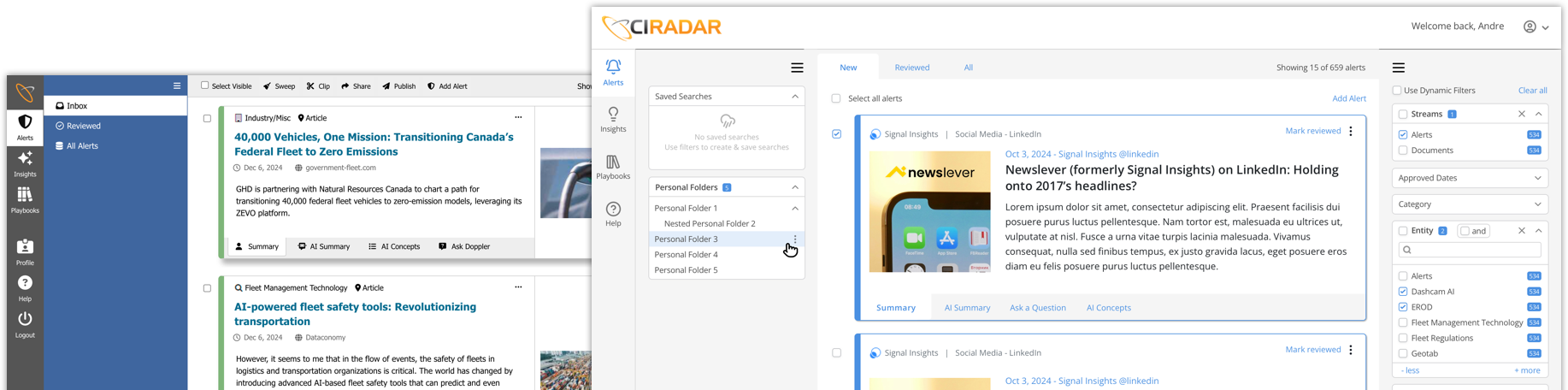
CIRadar had sophisticated filtering, saved search, and analytics capabilities that outperformed competitors. But the UI looked older than its feature set. Competing products with fewer capabilities looked more polished. The client wanted a visual refresh, scope constrained to the presentation layer, with no changes to existing layouts or user workflows.
Bootstrap 3 made a clean upgrade impractical
The app's reliance on Bootstrap 3, a rigid 12-column grid with predefined component styles, made a framework upgrade costly. Refactoring to Bootstrap 5 would have required extensive rework with high regression risk. The practical path: targeted CSS overrides, CSS Flexbox applied in isolated components, and selective UI updates that preserved backward compatibility with the existing structure.
Evaluate → brief → design → iterate → hand off
I started with an independent evaluation using a test account, documenting patterns, capturing assumptions, identifying where visual changes would have the highest impact. I compiled findings into a concise project brief that aligned on scope before any design work began. After initial mockups, one round of client feedback corrected a few assumptions about existing functionality. A second iteration resolved remaining refinements. The design-to-development handoff was straightforward, adherence to the existing layout meant the experienced developer could implement with minimal documentation.
Modern aesthetic. No disruption to existing workflows.
- Visual design modernized without changes to layout or user workflows
- CSS Flexbox improvements delivered within Bootstrap 3 constraints
- Smooth handoff, minimal implementation overhead for the development team
- Client satisfied; UI rollout in progress
A System for Measuring Design Impact
Our pre-release usability testing was rigorous. Once work shipped, our ability to capture user sentiment dropped off entirely. I built the infrastructure to close that gap.
Strong pre-release validation. No post-release signal.
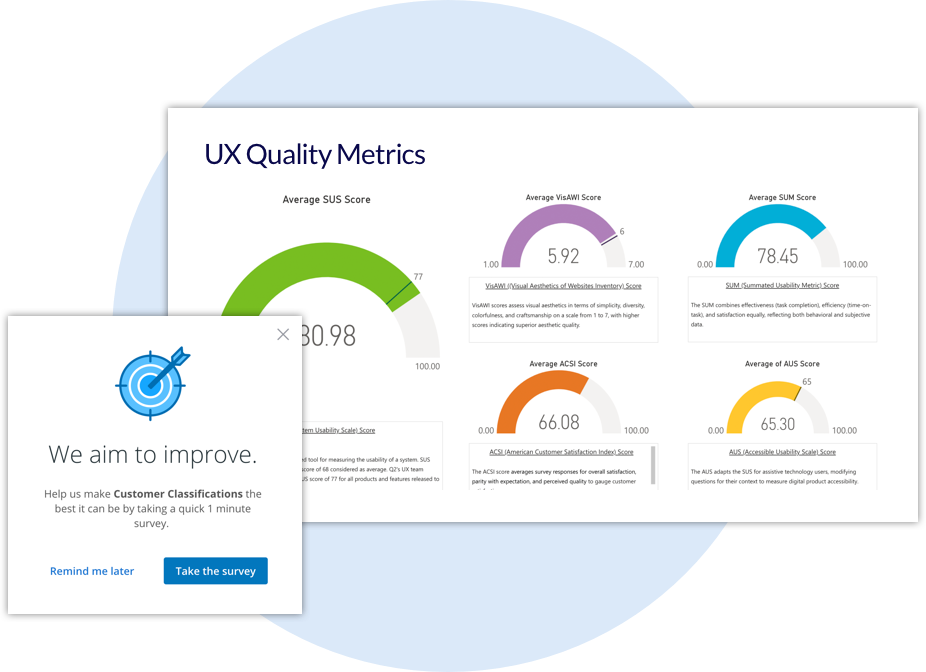
Our team used SUS, ACSI, VisAWI, and other benchmarks to validate design quality before handoff. These worked well for pre-release. After features shipped, feedback collection fell back on broad email CSAT surveys, low engagement, no targeting, no ability to isolate feedback by app, workflow, or user type. Leadership couldn't see the connection between design decisions and customer outcomes. UX's strategic impact was real but invisible.
We were already using a tool that could solve this
We used Pendo for behavioral analytics. Its Guides feature, typically used for in-app walkthroughs, could target specific users on specific pages after specific actions. I saw the opportunity: iframe a Qualtrics survey directly into a Pendo Guide. Targeted, in-context feedback, no inbox required, no list management, near-zero overhead to activate and deactivate per quarter.
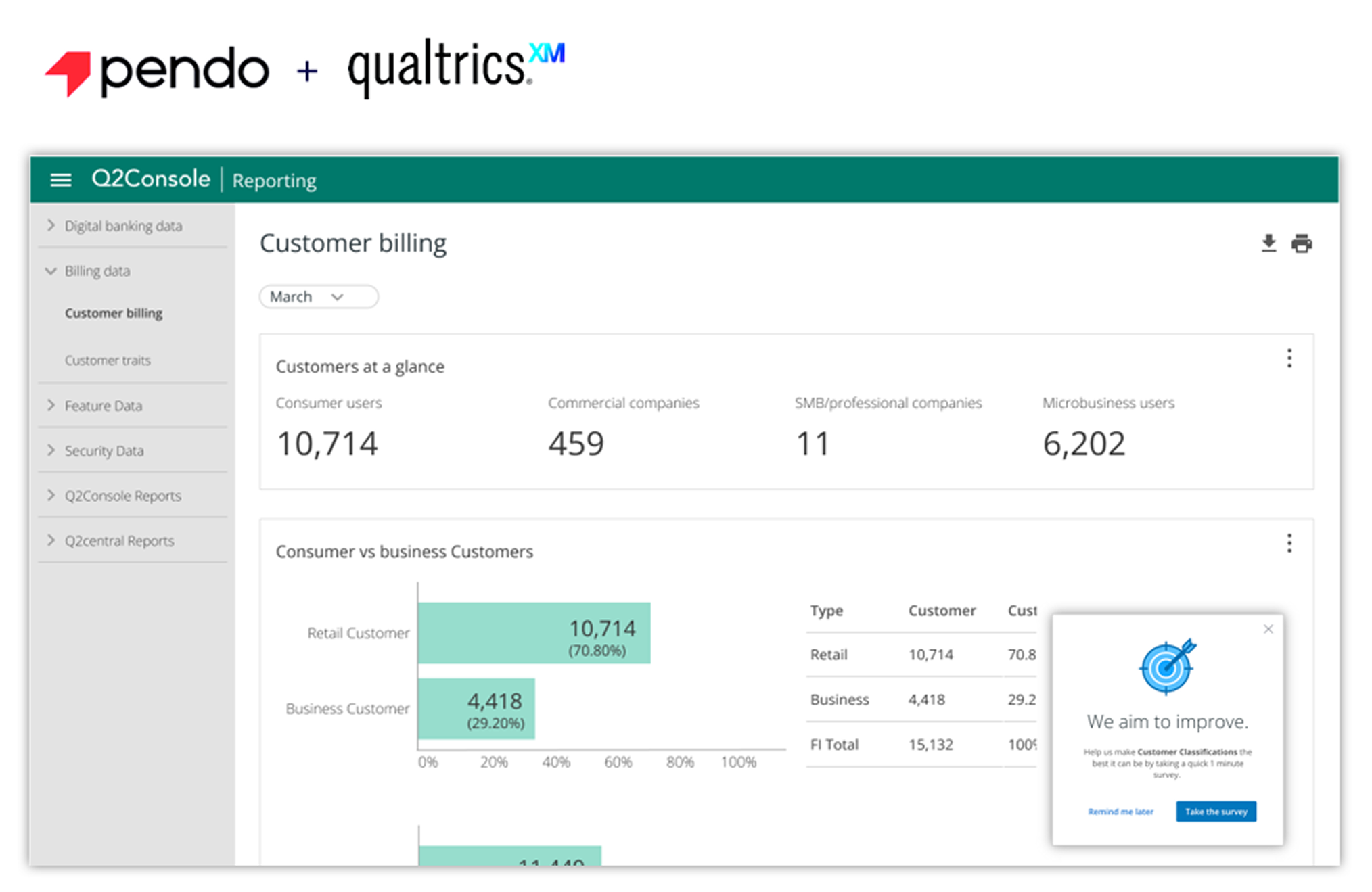
Embedded CSAT, intelligent targeting, unified dashboards
Working with Engineering, we embedded Qualtrics surveys directly into Pendo Guides, configured to appear only within specific apps, for specific user roles, on relevant page types, after key actions. Each application got its own CSAT Guide, toggled on for a few weeks each quarter, then off. No manual process. I then built Qualtrics dashboards for real-time trends and a PowerBI master dashboard that unified usability testing data, research insights, and CSAT results with feature-level drilldowns.
UX went from invisible to measurable
- Leadership gained a clear, data-backed view of how design changes improved satisfaction
- Product teams used CSAT trends to guide roadmap prioritization
- Engineering saw reduced rework, supported by concrete benchmarks
- UX elevated from execution-focused to a strategic partner with shared language across the org
| Area | Before | After |
|---|---|---|
| CSAT Collection | Broad email blasts | Targeted, in-product, contextual |
| Data Quality | Low engagement, inconsistent | High-precision, high-volume |
| Feedback Timing | Delayed, infrequent | Real-time, automated |
| Leadership Visibility | Limited | Centralized dashboards, clear trends |
| UX Influence | Hard to quantify | Measurable, strategic, trusted |
How Two Workflow Changes Turned Account Openings into Funded Accounts
The account opening flow worked. Sub-4-minute completion. Low drop-off. Strong metrics. The problem was what happened next, or didn't.
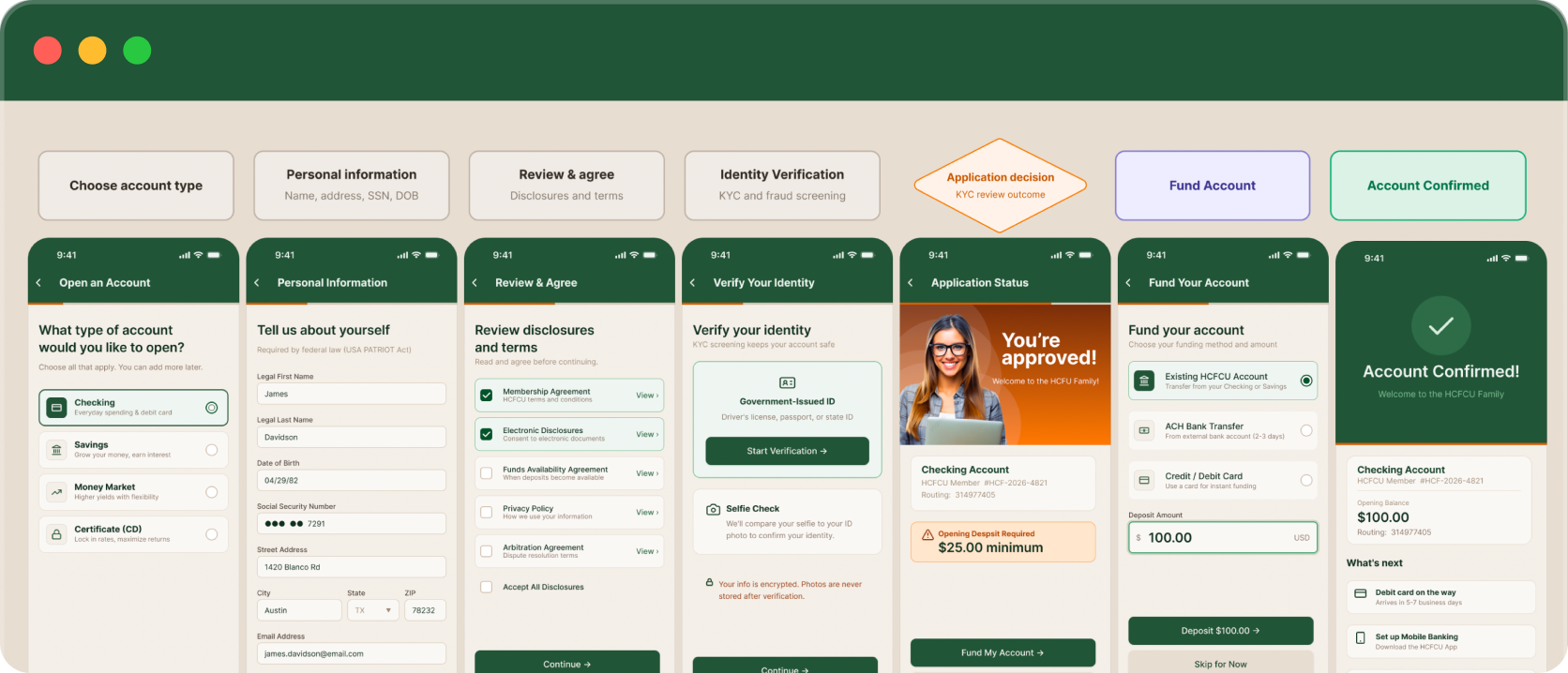
A successful onboarding that wasn't producing revenue
A newly opened checking or savings account isn't an active customer. A funded account is. Across Q2's financial institution clients, we were seeing the same pattern: users completing account opening and stopping there. Not abandoning, completing. The flow worked. But funding, treated as a separate post-onboarding task, was getting deferred. Sometimes indefinitely. Unfunded accounts meant no deployed capital, no interest revenue, and no live customer relationship for the institution.
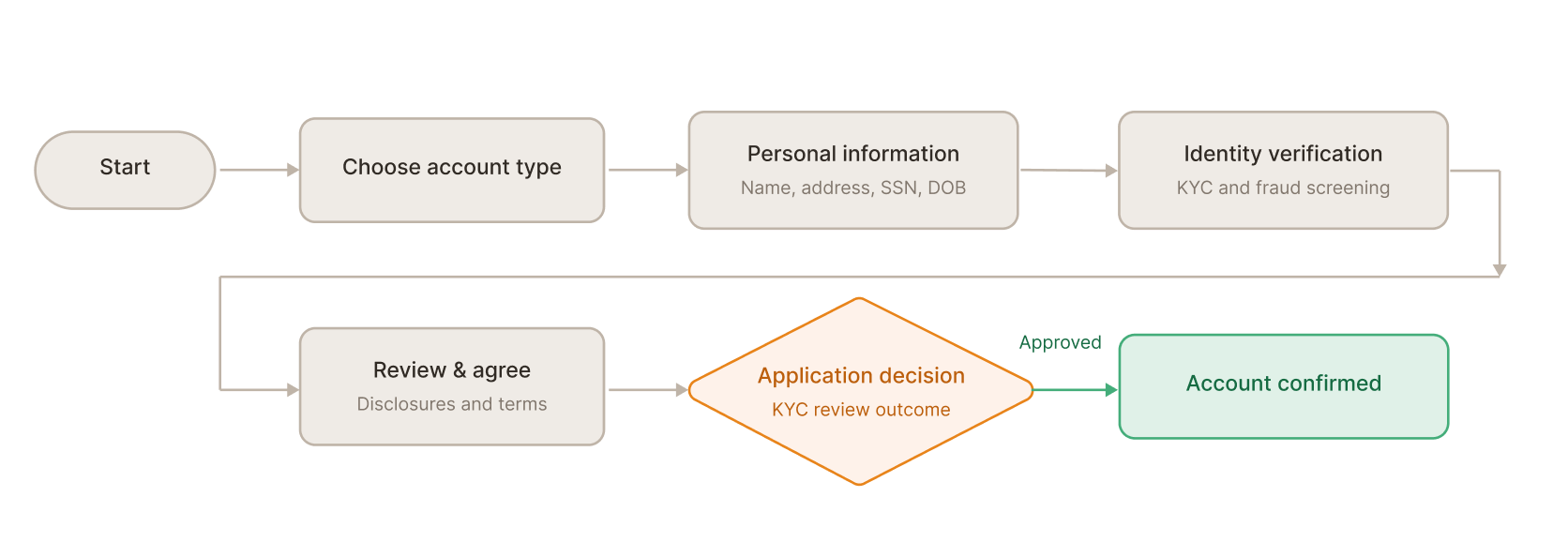
The workflow ended at the wrong moment
When users finished opening their account, they were told: your account is open, go fund it when you're ready. Funding lived outside the flow, and "when you're ready" frequently meant never. The account opening experience had a clear finish line. Funding didn't. This pointed to a focused direction: we didn't need to redesign the core workflow. We needed to extend it by two deliberate changes.
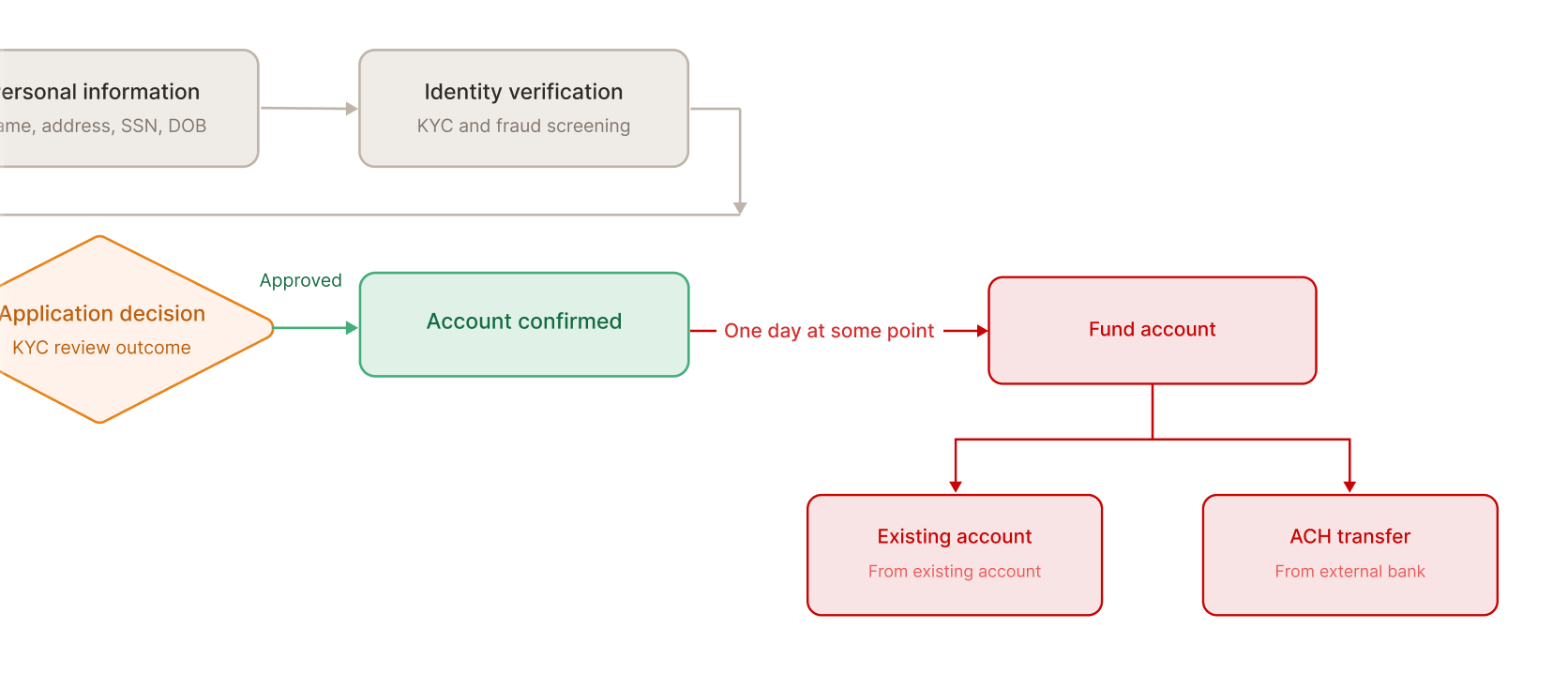
Two changes. Both targeted. Neither disruptive.
Change 1, Move funding into the flow. We placed the funding step immediately after account approval, before the confirmation screen. That moment, right after approval, is peak motivation. The account is real. The relationship has just started. Funding placed there lands completely differently than a follow-up email two days later. Nothing about the mechanics changed. The framing did: funding became part of the opening, not a follow-up to it.
Change 2, Add a funding rail users already trusted. Before, users could fund via existing account transfer or ACH bank transfer, both requiring routing numbers or credentials that a brand-new customer often doesn't have at hand. We added debit or credit card as a third option. Instant. No routing numbers. A mental model already internalized through years of e-commerce. One screen. Three funding contexts. Each option's timing made explicit so users could choose with confidence. The deposit field defaulted to $100, above the $25 minimum, a behavioral nudge that anchored users without removing their agency.
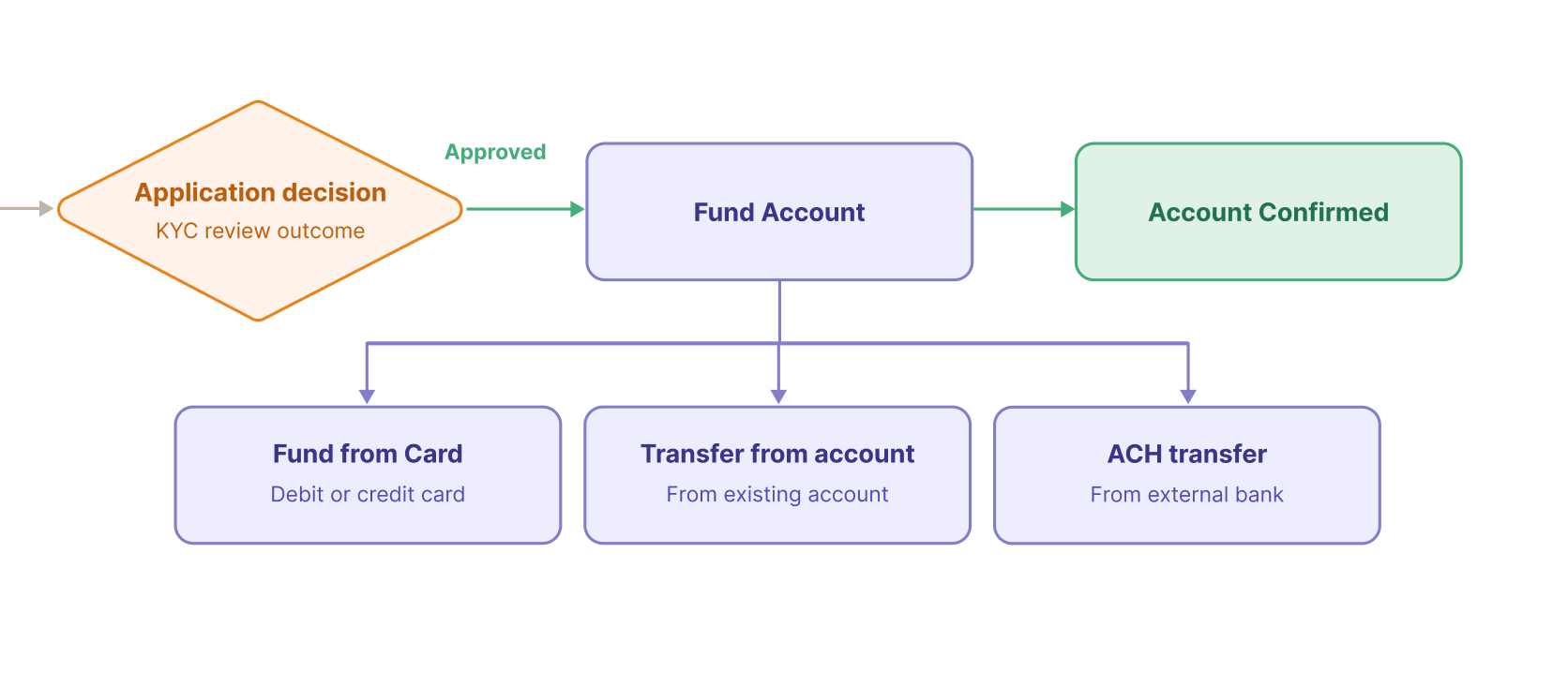
Better placement + better options = compounding improvement
- Immediate funding rate increased post-launch
- Average opening deposit increased post-launch
- Funding screen drop-off showed the sharpest improvement of any flow change
- Sub-4-minute completion promise maintained
Moving funding into the flow changed the psychology of the moment. Adding card funding changed the effort required. Neither change disrupted the core workflow. The changes compounded: better placement increased the number of users who reached the funding screen with intent to act; better options reduced the number who left without completing.